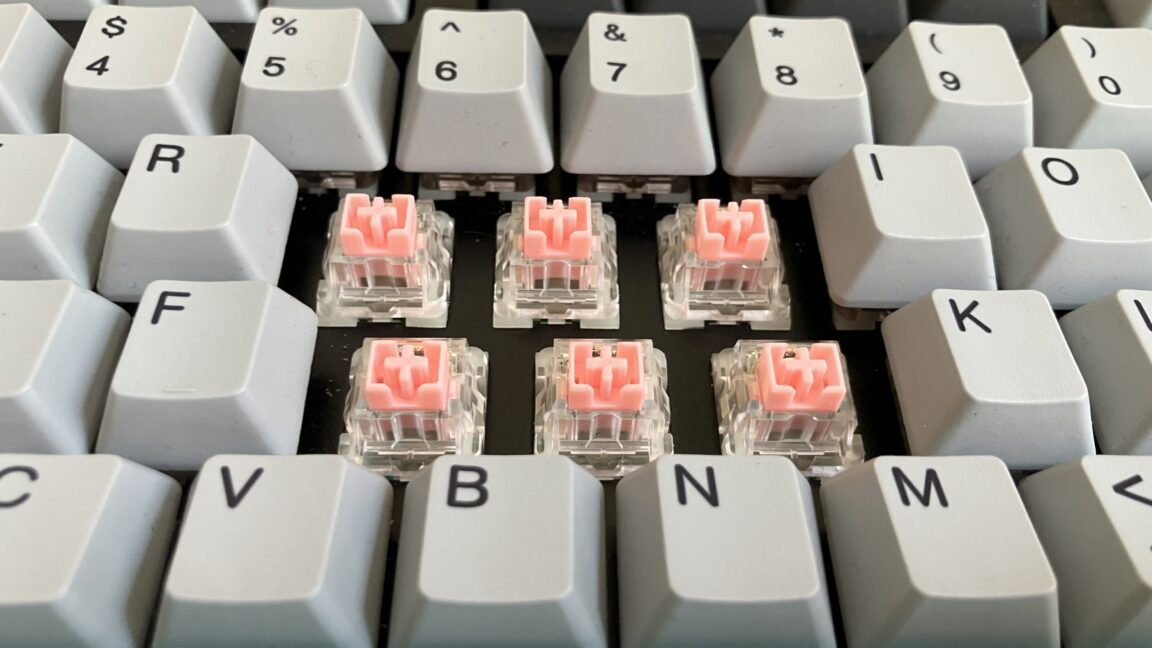
The mechanical keyboard isn’t always so mechanical anymore.
Over the past six years, keyboards with optical, Hall-effect, and other “contactless” switches have become increasingly common, often going for higher prices than traditional mechanical keyboards, which already command a premium over basic membrane boards. In return, they promise some theoretical advantages, particularly for gamers. In daily use, though, the differences can be pretty subtle.
So what exactly are you paying for? In this guide, we break down how the newest switches work, why contactless designs are becoming more popular, and where their advantages—and disadvantages—really matter.
First, let’s recap what happens when you push a key with a traditional mechanical switch inside.
As you can see in the diagram of a Cherry MX Brown switch below, standard mechanical switches have two metal leaves—in this case, the “crosspoint”—that are shaped differently, with the top of the larger leaf bent away from the smaller leaf.
When you press a mechanical switch, its plastic stem moves downward toward the keyboard’s PCB, and a spring wrapped around the stem compresses. As you release the button, the spring expands, forcing the stem back up to its original position.
When a switch is at rest, a protruding piece of the plastic stem keeps the switch’s two leaves from making contact. As the stem goes downward, that piece moves with it, allowing the leaves to touch and close a circuit on the keyboard’s PCB, which sends a signal to the keyboard’s microcontroller, telling the computer which input was made.
But because mechanical switches rely on the physical contact of internal components, they can degrade over time.
The switches in this guide differ from traditional mechanical switches because they don’t register input through contact between two metal leaves—hence the term “contactless.” Manufacturers often claim contactless switches last longer than regular switches, and they’re not susceptible to oxidation or corrosion, which can affect mechanical switches after prolonged use.
But there are other things to keep in mind for longevity. Contactless switches require specific PCBs, which are less common than those used for standard mechanical switches. And while hot-swappability can extend a keyboard’s life by making it easier to replace a broken key or change switches, hot-swappable PCBs for contactless switches—and prebuilt keyboards that support contactless switches and hot-swapping—are harder to find.
Newer standard mechanical switches, including some Cherry MX2A-series switches rated for 100 million keystrokes, can have lifespans similar to those of contactless options. If longevity is a priority, contactless switches may still be worth considering, but be sure to compare their ratings with those of standard switches.
Some users and companies claim that contactless switches feel smoother when pressed and reset because no metallic leaves touch. But other parts of the switch, like the spring and stem, can also create friction. I’ve occasionally noticed smoother presses with certain contactless switches (more on that later), but some premium standard switches, especially properly lubricated ones, can also feel extremely smooth.
If you want the best-feeling switches, look beyond whether they operate mechanically or through light beams or magnets. Factors like the switch’s specs, force curve, and materials can have a greater impact on how a switch feels.
Many contactless switches have customizable actuation points, a feature that isn’t possible with traditional mechanical switches. That can be helpful if you want some keys to feel stiffer or lighter than others (I prefer a stiffer spacebar, for instance), more flexibility over how keys respond, or analog input.
But software may not accurately reflect a switch’s actual actuation point. Review website RTINGs tested 14 keyboards with adjustable actuation from 11 brands and found that, on each keyboard, the keys actuated at a different distance than the one set in the companion app. We’re talking about differences of fractions of a millimeter, but it’s worth keeping in mind if you’re considering contactless switches for customizable actuation.
Some keyboards with contactless switches go further by letting users program keys so that one full press results in two inputs. For example, you can set a key to input “A” if you press it down 0.5 mm and then “B” if you press it down another 0.5 mm.
Some keyboards with contactless switches also support analog input, which lets the keyboard detect how far a switch has been pressed and adjust the input accordingly, giving gamers a joystick-like experience. Traditional mechanical keyboards don’t support analog input.
Contactless switches are becoming more common largely because of their potential appeal to gamers. Vendors often claim keyboards with contactless switches register input faster than traditional mechanical keyboards, mostly because the switches don’t require debouncing.
Debounce delay is the time between when a key on a mechanical keyboard is pressed and when the keyboard accepts the keypress as an input. The delay is necessary for standard switches because their metal leaves can rapidly bounce off each other when they make contact during a keypress. Debouncing ensures that the keyboard’s microcontroller doesn’t interpret these bounces as additional inputs (which would cause pressing “a” to register as something like “aaaa”). Keyboard firmware often handles debouncing, but hardware, like an FPGA, can also do it.
Most of us never notice debounce delays, and manufacturers rarely disclose how much debounce delay keyboards use, though keyboard enthusiasts often point to 5 ms to 20 ms as common. Cherry says some of its MX2A switches require “less than 1 ms” for debouncing. And keyboard manufacturers occasionally implement longer-than-necessary debounce times to compensate for switch degradation over time.
But keyboard latency, or the amount of time it takes from when you start pressing a key to when you see that key registered on-screen, depends on more than just sensing technology. Other factors include the keys’ travel and actuation times and the keyboard’s polling rate. A Bluetooth keyboard with full-height optical switches and a 133 Hz wireless polling rate, for instance, will still display more latency than a traditional mechanical keyboard with low-profile switches and an 8,000 Hz polling rate through a wired connection.
Again, for many of us, none of this matters. It’s primarily professional gamers who need a keyboard with ultra-low latency, and that’s assuming they’ve already reduced latency in more essential areas, like their GPU, CPU, and monitor.
And because contactless switches frequently target gamers, there are way more linear options than tactile or clicky ones.
Optical switches, which rely on an infrared (IR) light beam to actuate, first hit consumer keyboards in 2016.
Optical switches work differently depending on the manufacturer, but generally, each switch contains a light beam that is redirected when the switch is depressed. This causes the beam to either hit or stop hitting a dedicated photoelectric sensor, registering an input. When the spring resets the switch, the light beam returns to its original position.
Most optical switches rely on an IR light and a sensor that are integrated into the keyboard’s PCB.
“In both Razer Optical Switches and Analog Optical Switches, the IR emitter and sensor are mounted on the keyboard’s PCB, with the switch stem acting as the ‘shutter’ for the light path,” a Razer spokesperson told me. “This PCB‑based design has remained consistent across generations. What has evolved over time are the exact positioning, components, and firmware processing—advancements that enable features like adjustable actuation points, Rapid Trigger, and full travel‑distance tracking in our analog switches, rather than simple on/off detection.”
Companies selling optical switches often claim they are faster than traditional switches. Because they don’t require debouncing, that’s technically true. And PC gaming peripheral companies often pair optical switches with high polling rates for even wider claims of ultra-low latency.