Affiliate links on Android Authority may earn us a commission. Learn more.
I haven’t used an OPPO Reno phone since 2022’s Reno 8 Pro, so I wasn’t really sure what to expect from the Reno 16 Pro (£899 at Oppo) before it arrived.
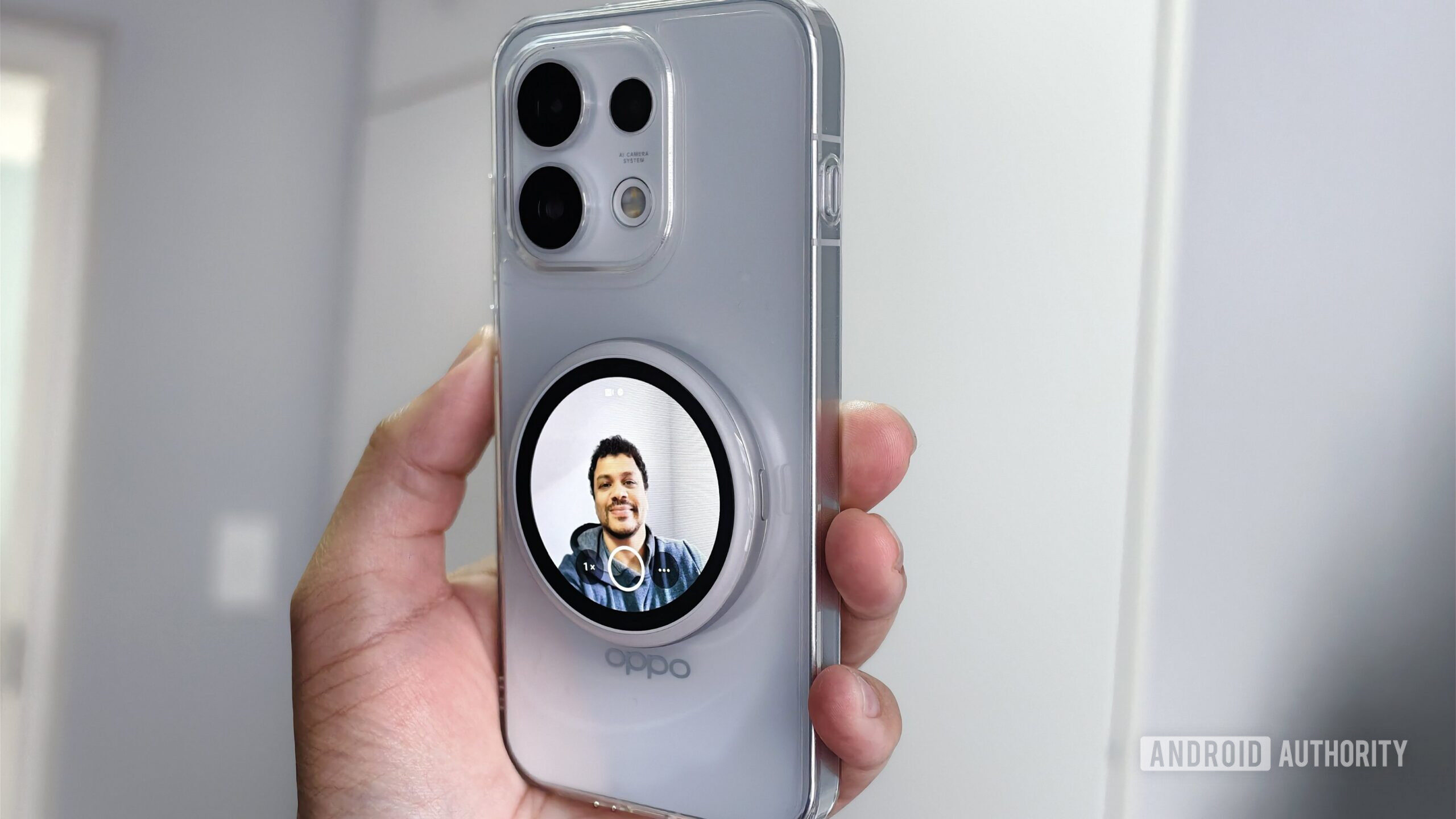
Then I saw that the phone is compatible with an official magnetic case and rear display combo. Evidently, OPPO is jumping on a minor trend we’ve seen in the last year or so, with Xiaomi reviving the integrated rear display while accessory makers have released add-ons that attach via a magnetic connection.
So is this just a gimmicky add-on, or are these all genuinely worth buying? Let’s find out.
The OPPO Bubble is pretty much just meant to serve as a viewfinder for the rear cameras. That’s handy as these cameras are usually much better than the selfie shooter on any phone, so this add-on takes a lot of the guesswork out of framing your photo or video while using the superior rear cameras for front-facing shots and clips. In fact, OPPO is positioning the phone and Bubble as being ideal for vlogging, which makes total sense, though this could also be useful for anyone who is a fan of taking selfies with the ultrawide rear shooter.
The Bubble hardware is absolutely tiny, about the size of a Jaffa Cake or an Oreo. It’s super light too, and features a single button and a USB-C port. The Bubble attaches to the Reno 16 Pro’s magnetic case via (surprise) an integrated magnet. My main complaint is that the magnetic connection is very weak, as I could dislodge it by tapping the accessory’s power button. As a result, I’d probably detach the screen and keep it in my bag or pocket for most outings, only attaching it when I know I’ll need it.
Setting up the Bubble is pretty easy, although I had to factory reset the add-on to see the Bubble app on my phone. Using it is a piece of cake, though. Simply swipe up to activate the camera app and viewfinder, swipe down for a truncated list of quick settings (scheduled screen off, brightness, lock screen, settings), and hold on the home screen to switch backgrounds. Once you’re in the camera app, you can swipe laterally to switch between photo and video modes, tap the zoom icon to switch zoom levels (0.6x, 1x, 2x, 3.5x), tap the settings icon to access countdown and mirror toggles, and hit the shutter button to take pictures or videos.
It’s all simple stuff, although I’d prefer a Bubble-specific countdown toggle, since your choice currently only appears in the main camera app. That’s not great when you actually need to take photos of other subjects, only to be greeted by a three-second timer. I’m also disappointed that the Bubble doesn’t support palm shutter gestures.
Is it actually worth using, though? Well, if you want to use your smartphone for vlogging or simply want higher-quality selfies and videos, the OPPO Bubble is a neat bit of kit. I also quite like the fact that you can still use it while detached, treating it like a remote shutter with a built-in screen. That’s great in theory if you use a tripod for some smartphone photography sessions, but you can’t access more advanced shooting options, such as portrait or night modes, via this setup. What a shame, as that’s when a tripod would be particularly handy.
I do feel like some users might generally forget about this add-on, though. Selfie cameras are pretty good these days, and many phones support 4K/30 fps or 4K/60 fps front-facing capture. But that doesn’t change the fact that it’s a great extra if you’re a dedicated vlog creator or simply want to take amazing ultrawide selfies.
OPPO also offers wallpaper customization, as you can set photos, videos, or motion photos as backgrounds. You can even set a sequence of media that will shuffle around as a wallpaper carousel (e.g, a couple of photos and a short video). The firm also offers a small variety of OPPO Pets as an alternative to wallpapers. It’s no Tamagotchi, but you can swipe on these virtual pets to see different animations. You’ve also got a tag holder that lets you attach the Bubble to items (e.g., your bag). These are all welcome additions, but I would’ve liked to see more practical features here.
Unfortunately, it doesn’t look like OPPO has released an app on the Play Store so other Android phones can use the add-on, with the exception of OPPO’s own Find X9 series, which is listed as being compatible. You know what device got an app, though? The iPhone. I can understand the logic behind releasing an iPhone app given the platform’s MagSafe support, but there are a few Android phones with integrated magnets and loads of handsets with optional magnetic cases. That means you might have to leave the Bubble behind when upgrading to a new Android phone — here’s hoping OPPO changes this soon.
The real drawback, though, is the price. At £99 for the Bubble and £29.90 for the magnetic case, that’s almost £130 on top of the phone’s regular price of £899 (or the current £749 deal price). For die-hard vloggers, I can see the appeal to some extent, though you can grab decent dedicated gimbal cameras for that combined £130 price tag. For everyone, else, that’s a lot to ask for something you might not use very often.
Of course, who cares about taking photos with the rear cameras if they’re not great in the first place? OPPO’s phone brings a pretty intriguing camera setup on paper. We’ve got a 200MP HP5 main camera, a 50MP 3.5x telephoto camera, and a 50MP ultrawide shooter. This would be on par with flagship Android phones from several other manufacturers.
I didn’t test the Reno 16 Pro cameras exhaustively, but I was pretty happy with photos from these shooters in daylight. Some snaps were a bit too sharp for my liking, but the colors were generally pleasant without going overboard. The 200MP camera is a solid performer at night for 1x shots, delivering adequate brightness and a slight mushiness in extreme darkness. However, the ultrawide camera is noticeably worse, with significantly darker, mushier snaps.
The 3.5x tele camera takes some good shots in broad daylight, but image quality takes a nose-dive in mixed lighting. OPPO aggressively defaults to crops from the 200MP camera as soon as the light levels drop anyway, but even these cropped shots can look quite overprocessed. I was also sad to see that the tele camera isn’t capable of macro snaps, as OPPO switches to crops from the 1x shooter instead.
I do appreciate OPPO’s dynamic high-resolution capabilities. Enable the “High resolution” toggle in the camera app’s settings, and the phone will automatically capture ~26MP shots when there’s sufficient lighting. I would’ve liked to see a 200MP toggle, though. There is a high-resolution capture mode, but this is a purely dynamic affair that doesn’t let you force 200MP snaps.
I’m also pleased to see the various scene modes (stage, silhouette, fireworks) as well as a Pop mode that offers various film simulations. You’re not getting as many camera features as most flagships, but what’s here is good.
The first thing I noticed after unboxing the Reno 16 Pro itself is just how small it is. It’s still not on par with truly small phones of yesteryear, but the 6.32-inch display means it’s comparable to the Pixel 11 and Galaxy S26. In fact, it’s actually a little smaller than the Google device. The second thing I noticed about the phone was its heavily iPhone-inspired design. OPPO isn’t the only company guilty of this unimaginative approach, but considering OPPO’s high-end Find series has delivered some incredible aesthetics over the years, I’d love to have seen a little more ambition here.
Perhaps that ambition was reserved for the hologram-of-sorts on the rear cover, but I’m not sure it should have been. I’m all for manufacturers trying new things, but this made me feel vaguely queasy, as if I were playing a Nintendo 3DS game at the wrong angle (my girlfriend also likened the visual effect to watching a 3D movie without glasses). Otherwise, I appreciated the sturdy metal frame but could do without the slightly confusing SIM card ejection bay location. So don’t be too hasty in sticking your SIM removal tool in the phone.
As for durability, OPPO says the Reno 16 Pro has its in-house Crystal Guard protection on the front and back. OnePlus previously noted that this tech was on par with Gorilla Glass Victus Plus. Otherwise, you can expect an IP69K rating, so you know your phone can survive a dunk in the swimming pool or an accidental pressure-washing of sorts (despite the weird gimmickry around IP69 ratings in general).
OPPO’s Reno phones usually make their mid-range trappings known when it comes to performance. The Reno 16 Pro seems no different on paper, as it ships with a MediaTek Dimensity 8550 Super chip. This isn’t a bad processor by any means, as the all-medium-core CPU (Cortex-A725) is a welcome sight. There’s no big Cortex-X core here, though.
GeekBench 6 testing shows that the big core is dearly missed, as the OPPO Reno 16 Pro lags behind competitors like the Samsung Galaxy S25 FE and OnePlus 15R. The Samsung comparison is particularly interesting as its CPU cores are a generation older, while the chip also offers four little cores.
The Reno 16 Pro is also equipped with an Arm Mali-G720 MC8 GPU, putting it squarely in mid-range territory. That said, the phone delivers impressive, rock-solid stability in the 3DMark Wild Life Stress Test. It passed the Galaxy S25 FE just before the halfway mark and held a firm lead right to the end, all while running cooler than Samsung’s handset. This stability even allowed it to narrow the gap to the OnePlus 15R.
The Extreme Stress Test was a different story, though. OPPO’s phone saw a gradual decline until run number seven, after which it remained competitive with the Galaxy S25 FE. Unfortunately, we then saw a series of dramatic valleys and peaks while Samsung’s phone held much better stability. This suggests that cutting-edge games might run better on Samsung’s phone, let alone the OnePlus 15R. But the unfaltering stability during the earlier stress test could be a good sign for less demanding games and use cases.
The good news is that real-world performance seems very smooth during my brief time with the phone. I had no issues with multitasking, launching apps, using the camera, or other everyday tasks.
Another key selling point of the Reno 16 Pro is its 6,700mAh silicon-carbon battery. I didn’t spend enough time with the phone to definitively ascertain its endurance, but it should last for a full day and some change. I’m also pleasantly surprised with the battery capacity, given the phone’s size. European phones get a 6,000mAh battery, though. Still relatively large, but a downgrade regardless.
Once you’ve run out of juice, you can top up with 80W wired charging. You can also take advantage of 55W PPS charging if you don’t have an OPPO-branded charger. It’s a pity OPPO hasn’t followed Xiaomi by offering maximum speeds via PPS. There’s also no wireless charging here, which isn’t a surprise given that this is an upper mid-range series. But I can see some buyers being disappointed when the Pixel 10a and Samsung’s FE phones still offer wireless top-ups. It’s also a bit of a shame in light of the magnetic case.