Affiliate links on Android Authority may earn us a commission. Learn more.
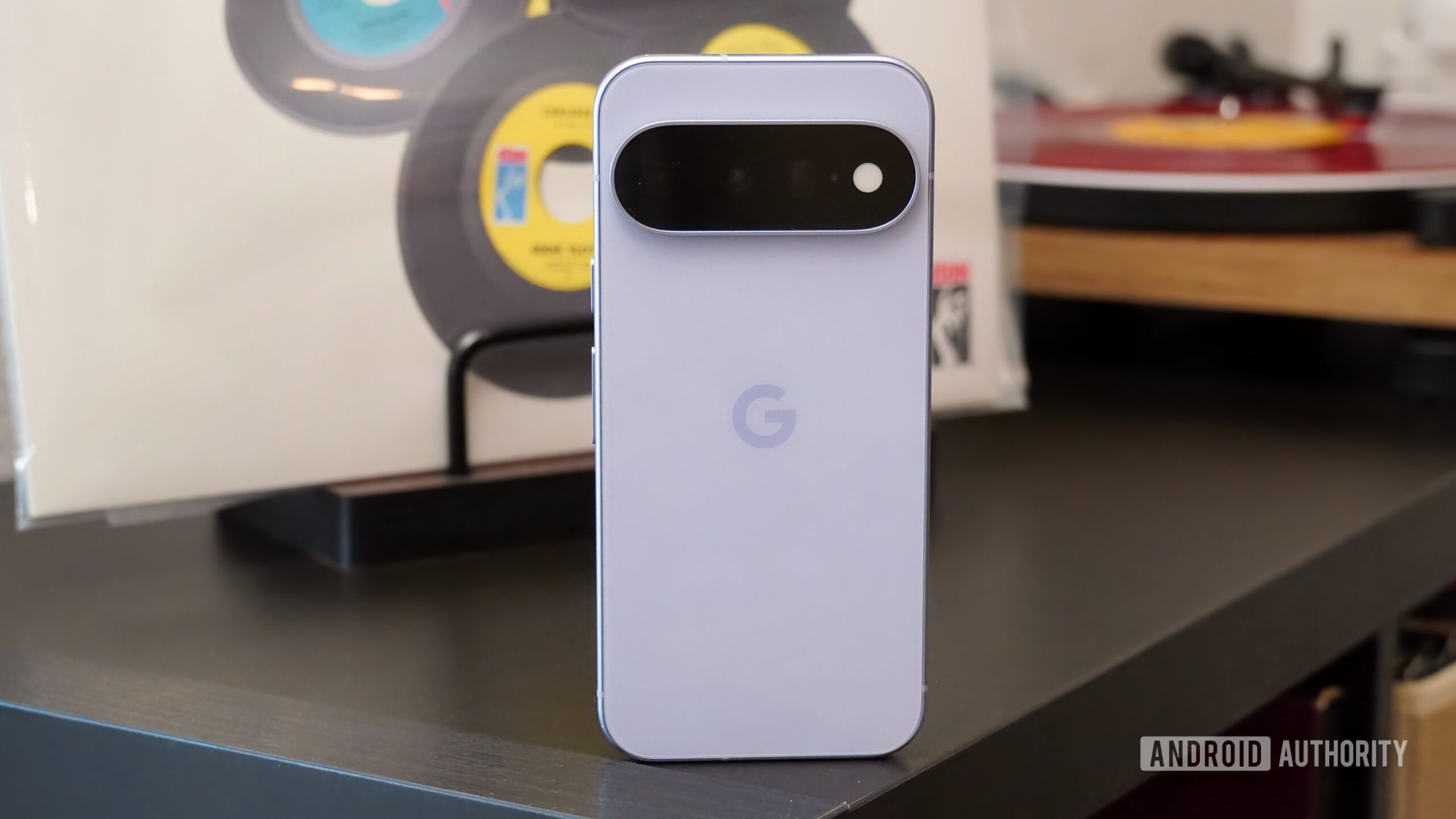
As soon as I picked up the Google Pixel 11 for the first time, I knew I wanted to love it. The slimmer, all-glass camera bar spoke to me as the perfect blend between the Pixel 10a’s flat back and the Pixel 11 Pro’s thicker camera housing. My favorite Android 17 perks, like the Pixel-exclusive Magic Capture and Creator Suite, still made the cut for Google’s cheapest flagship. And the missing features aren’t significant enough to notice they’re gone on the $899 Pixel 11.
Unfortunately, after actually getting my hands on one, I found the Pixel 11 hard to love. The Tensor G6 chip isn’t the upgrade I hoped for, and without the vapor chamber found on the Pro phones, the Pixel 11 does genuinely overheat and stutter in everyday use. It’s harder than ever to choose between the Pixel 11 and, say, the Samsung Galaxy S26. I’ve tested both, and they each come with brutal compromises I’d rather not make.
For those who absolutely must have a Pixel phone, the Pixel 11’s value proposition is surprisingly good, and I’ve found that the day-to-day experience — outside of performance hiccups — is mostly consistent across models in the Pixel 11 family. This iteration of Pixel flagship is unlikely to change the minds of critics, however.
The Google Pixel 11 camera bar secretly contains the best design improvement of any 2026 model, and no, I’m not talking about HiLight. The base Pixel 11 actually omits HiLight completely, and you probably won’t miss it. In its limited fashion, HiLight is merely a glow light on the camera flash that displays unique colors for specific contacts and when Gemini is active. However, the unimpressive nature of HiLight only makes me wonder why it’s a “Pro” phone exclusive in the first place.
Instead, my favorite Pixel 11 tweak is the new camera bar. Like the other models, the Pixel 11 has edge-to-edge glass on its camera bar. It’s the only variant to get a slimmer camera bar — 40% slimmer, in fact. I held every model in the Pixel 11 series, and the base model looked and felt more modern than the others. The thinner camera bar is to thank. It’s a design leap that can be equated to the jump from the Pixel 8a to the Pixel 9a, another example of Google shrinking a phone’s camera housing.
Google only partially addressed my biggest gripe with Pixel phones: their thickness and weight. The Pixel 11 weighs 197 grams, and it’s seven grams lighter than the Pixel 10. That might not seem like a lot, but compared to the 167-gram Galaxy S26 and the 177-gram iPhone 17, it’s a welcome step in the right direction. The thickness, unfortunately, is unchanged. The Pixel 11 measures 8.6mm, and it’s thick and hefty for a base model.
I’m able to forgive the Pixel 11’s substantial build this year for two reasons, though. First, the thinner camera bar makes the phone’s official 8.6mm thickness more honest. When you add the right case to a Pixel 11, it levels the phone out, eliminating the camera bump’s protrusion. This is a nice touch compared to the Pixel 10, which had a thick chassis and a thick camera bar.
The other reason is the inclusion of Qi2 magnets. This isn’t new to the Pixel 11 series, but until other Android brands adopt the feature en masse, it’ll remain a novelty worth mentioning. Apple figured out how to integrate MagSafe into its phones without compromising thickness and weight, and someday, I hope Google does too. For now, I’ll reluctantly appreciate the Pixel 11’s rare Pixelsnap support in exchange for a thicker and heavier phone.
I’m generally drawn to the base Pixel 11 more than the Pro models this year, because Google is rapidly closing the gap between these phones. The Pixel 11 doesn’t just support magnetic Qi2 charging like the Pixel 10. It also supports the newer Qi2.2 spec, which was exclusive to the Pixel 10 Pro XL last year. That brings 25W fast wireless charging to the Pixel 11. The 30W wired charging could be faster, but you can still charge the phone’s 4,985mAh battery to 55% in 30 minutes.
The screen uses the exact same panel as the Pixel 10, and that’s not necessarily a bad thing. It’s a 6.3-inch panel with vibrant colors, and I sometimes prefer to switch the display’s color mode from “Adaptive” to “Natural” for a less-saturated look. I don’t have many complaints about the Pixel 11’s display, aside from the fact that 120Hz is disabled out of the box. I suspect many Pixel 11 owners will use their phone without realizing the screen is capped at 60Hz by default.
That said, there’s clear room for improvement, and it’s a bummer Google didn’t proactively make changes here. The Pixel 11 doesn’t have an LTPO screen, and this means the display can only switch between 60Hz and 120Hz. It can’t variably fluctuate between 1 and 120Hz like the Pixel 11 Pro and Pixel 11 Pro XL screens. The 3,000-nit screen is plenty bright outdoors, but it can’t reach the 3,600 nits offered by the Pro models.
The one Pixel 11 Pro display feature I’m truly jealous of is the scratch-resistant display glass. Both phones technically use Gorilla Glass Victus 2, but Google says the Pixel 11 Pro and Pixel 11 Pro XL offer more than twice the scratch resistance. If it’s anything like what I’ve enjoyed from Apple’s Ceramic Shield 2, it could prove to be a sleeper Pixel 11 Pro upgrade. I’ve only noticed one or two minor scratches on my Pixel 11 review unit so far, but I’d throw on a screen protector if you prefer to keep your phone pristine.
Every year I review a Pixel phone, I wonder if this will be the one that Tensor catches up to the competition. I’ll be waiting at least another year.
The Tensor G6 chip powering the Pixel 11 is a cut above the last-generation Tensor G5, but it still lags behind Apple and Qualcomm processors. I want to say that the Pixel 11 performs fine in daily use despite its lowly benchmark scores, but I can’t. I experienced laggy animations and overheating at times, and that isn’t what I expect from a $899 phone.
It has the same 12GB of RAM as the Pro models now, but the base Pixel 11 is the only model in the series to ship without a vapor chamber for cooling, and it shows. I have a hunch that this is why my review unit had a tendency to overheat or stutter during normal use. It’s also worth noting that I live in the Phoenix desert, where temperatures above 100°F are normal for most of the year. Regardless, I test every phone in these conditions. I haven’t had overheating meaningfully impact the user experience of a smartphone like this since the iPhone 15 Pro Max.
Aside from general sluggishness outdoors, the Pixel 11 outright disabled certain camera features due to heat. The screenshots below show the messages from the Pixel Camera app, which explain certain zoom and Creator Suite features were turned off because the “device is too warm.”
This wasn’t overheating caused by a benchmark or stress test. It wasn’t even the result of an intense workflow like gaming or video editing. I was genuinely trying to take photos at the Phoenix Zoo while testing features like Magic Capture, Creator Suite, and 30x Super Zoom — but I couldn’t. That was a letdown, to put it mildly, in what was a real-world test reflective of what many users are likely to experience.
One good thing I can say about the Pixel 11’s chip is that it performs in line with the rest of the Pixel 11 family when it hasn’t hit those temperature thresholds. Although the other three models have vapor chambers and the Pixel 11 Pro Fold ships with more RAM, these upgrades don’t yield significantly higher performance in stress testing.
To that end, the Pixel 11 actually beat the Pixel 11 Pro XL and the Pixel 11 Pro Fold in a few tests, including Geekbench 7. Of course, in our real-world testing, we didn’t encounter any overheating on the Pixel 11 Pro models, so that’s also something to consider.
Compared to last year’s Pixel 10, we do see the Tensor G6’s better CPU performance show up in the Pixel 11’s benchmark results. However, I’m not sure how much stock to put in that result, since my Pixel 11 still suffered from lag and overheating in real-world usage. Looking at the Pixel 11 against competitors like the Galaxy S26 and the iPhone 17, the Tensor G6 is laughably behind.
It’s easy to use the Pixel 11 without any performance hiccups, but it’s also not hard to run into roadblocks. I don’t think mobile gaming is an unreasonable task for an $899 flagship, and the Pixel 11 doesn’t handle it well. My usual game of choice is Fortnite, and even at low settings, it was unplayable on the Pixel 11 — I had frame rate lows of 9 FPS, which isn’t sustainable for a competitive shooter where every frame counts. Meanwhile, the Galaxy S26 and Galaxy Z Fold 8 can sustain frame rates well above 100FPS in my testing, thanks to the superior Snapdragon 8 Elite Gen 5 for Galaxy chip.
We see the Pixel 11’s gaming woes chronicled by 3DMark’s Wild Life Extreme stress test. For starters, it’s unfortunate that the Pixel 11 barely beats the Pixel 10 in gaming performance, as this was arguably the area most in need of improvement.
The phone gets hot, topping out at 46°C toward the end of the stress test. This is about on-par with the Pixel 10’s performance, but it’s hotter than the Galaxy S25, Galaxy S26, and iPhone 17 ran during the stress test. We’re only talking about a difference of a degree or two here, but the Pixel 10 and Pixel 11 reached these temperatures while posting significantly lower scores and frame rates than the other phones. This is also hotter than the Pixel 11 Pro models, which both came in below 45°C — a sign of the vapor cooling in action.
Back to the good, the Pixel 11 is excellent on battery life. I regularly enjoyed more than five hours of screen-on time while using about 75% of my battery. The Pixel 11’s battery lasted all day, even during long travel days with flights, Uber rides, and hotel check-ins. It’s also worth noting that 25W magnetic wireless charging made mid-day recharges easy when I forgot to charge the Pixel 11 overnight, though the base 30W wired charging isn’t anything to write home about.
It’s hard not to gush about Pixel software. Whenever I switch back to a Pixel phone, I’m reminded why so many Android enthusiasts swear by them. The Pixel 11’s software is indeed the best version of Android 17. While skins like One UI 9 undoubtedly offer more features for power users, the simple and intuitive nature of Android 17 is easy to love, and incredibly well supported with a seven-year update policy. As for the Pixel-exclusive features on the Pixel 11 series, they’re a mixed bag.
The headline feature this year is Proactive Assistance, which uses Gemini Intelligence to anticipate your next move before you do. It’s quite similar to Magic Cue on the Pixel 10 series, but I saw Magic Cue organically appear on my Pixel 10 Pro review unit a grand total of zero times. I have seen Proactive Assistance show up a few times while reviewing the Pixel 11, usually offering to create a Google Calendar event or check my schedule.
The best Pixel-exclusive features, in my book, are the ones that have been around a while. Proactive Assistance was there, but never in a way that saved me time. Instead, it’s features like Now Playing, Pixel Recorder, Call Screen, and Hold for Me that keep me coming back for more. These are available on the Pixel 11, and they shine brighter than any of Google’s flashy new tricks.