Apple Intelligence has arrived on HomeKit Secure Video. Here’s how its new features compare with Ring and Nest — and how well each tells you what’s happening and what really matters.
If you buy something from a Verge link, Vox Media may earn a commission. See our ethics statement.
If you buy something from a Verge link, Vox Media may earn a commission. See our ethics statement.
A few years back, I was at a beachside Easter egg hunt, watching my kids dash through sand dunes searching for sweet treats. My phone buzzed in my pocket; I ignored it. A moment later, it buzzed again. I pulled it out, glanced down, and saw a “motion detected” notification from my security camera. “Just my dog in the yard,” I thought, dismissing it.
As the colorful eggs piled up in the baskets, my phone kept buzzing. Reluctantly, I pulled it out again and saw several more “motion detected” alerts. I tried to load a video clip, but it just buffered endlessly.
AI-powered text descriptions paint the whole scene in a sentence.
When I returned home, I found my four pet chickens dead, killed by my small border terrier. Looking back over the camera footage, I saw that they had pushed open their coop door, which I, in a rush to get to the Easter festivities, hadn’t properly secured.
If instead of “motion detected,” that first notification had read “small dog chasing a chicken,” I would have raced back home and maybe saved them.
Today, that type of notification is possible. With AI-generated text descriptions, a short message describing what the camera saw can arrive almost instantly, well before a video feed loads, painting the whole scene in a sentence.
Most major security camera companies now offer text descriptions, which combine traditional motion triggers with Vision Language Models, including Ring, Google Nest, Blink, Wyze, and Arlo. This month, with iOS 27, Apple finally brought the capability to its HomeKit Secure Video service with the launch of Apple Intelligence for Home.
The surprise is that Apple is charging up to three times as much as its competition for the feature. Is it worth it? And are security cameras getting better at telling us about what actually matters?
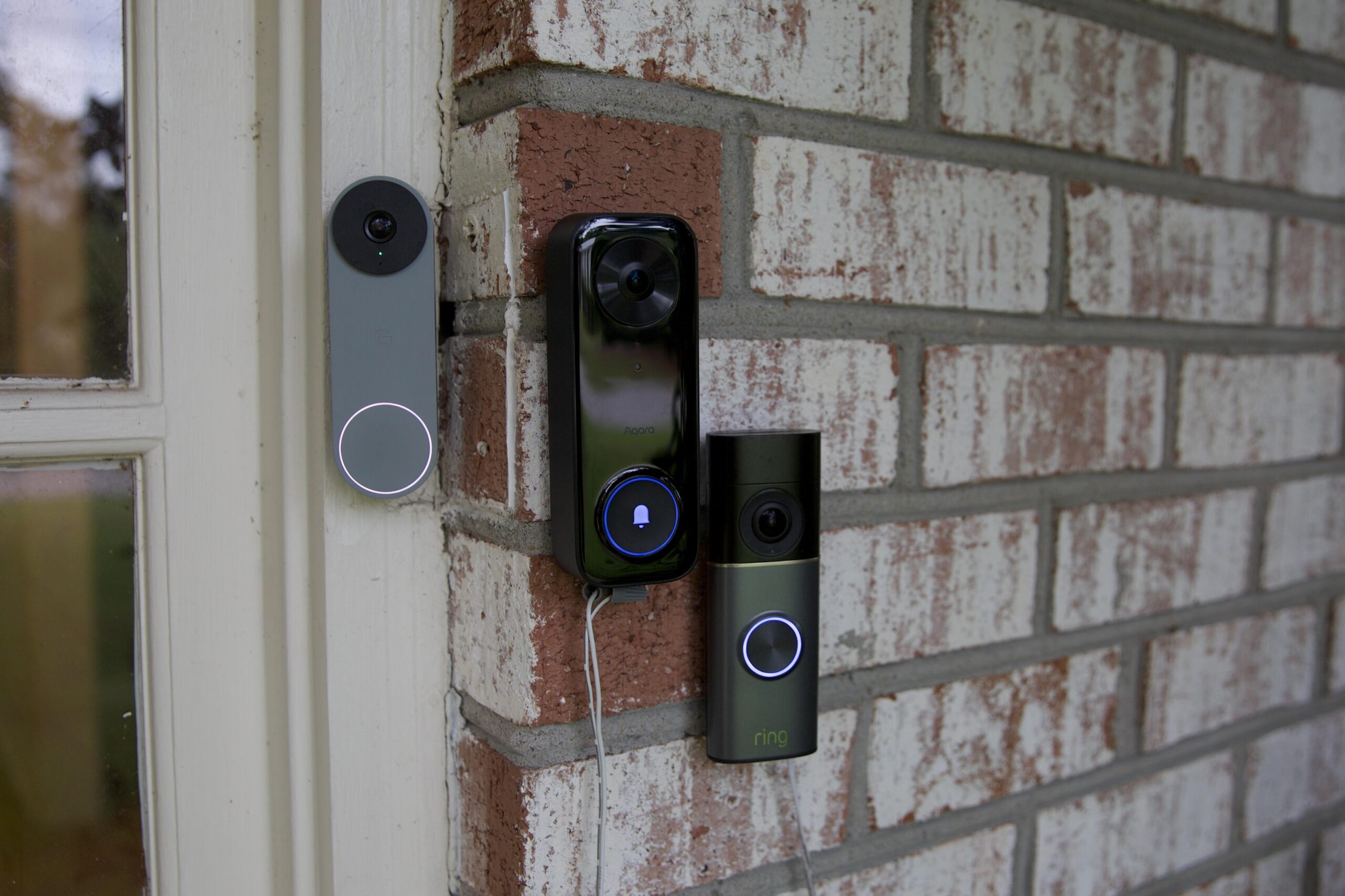
I’ve been testing Apple Intelligence for Home since it launched in beta this summer, alongside Amazon Ring’s and Google Nest’s AI camera features introduced last year. I installed several cameras for each, but for this piece, I focused mainly on video doorbells — which I set up when iOS 27 officially arrived on September 14th. I tested a Ring Wired Doorbell Pro ($249.99), Google Nest Doorbell 2K ($199.99), and for Apple, the HomeKit Secure Video-compatible Aqara Doorbell Camera G400 ($99).
I focused on how quickly each service sent the AI-powered notifications, how accurate and useful the descriptions were at telling me what happened, and how reliably it captured and notified me about activity. I also tested other AI-powered features each platform offers, including Apple’s ability to search and stitch together activity across multiple cameras, Ring’s Unusual Events that distinguish normal activity from out-of-the-ordinary events, and Google’s ability to trigger automations based on what a camera sees.
The AI features on all three platforms are a significant improvement over their basic smart alerts. It’s now easier to understand what’s happening at a glance and decide whether to react, and security cameras feel more useful and less annoying overall. Ultimately, the real value of AI in cameras isn’t in describing what they see, but in using that knowledge to figure out what you actually need to know, and eventually what your home should do about it.
You need an iCloud Plus plan, a HomeKit Secure Video-compatible camera, an Apple Home Hub running HomePod/tvOS 27, and an AI-capable iPhone running iOS 27. Three iCloud Plus tiers support Apple Intelligence on one or more cameras:
Note: standard HomeKit Secure Video recording also requires an iCloud Plus plan, starting at $0.99 for one camera (50GB plan), $2.99 for five (200GB), and $9.99 for unlimited (2TB). All tiers that include Apple Intelligence support basic HKSV features on unlimited cameras.
Apple Intelligence is on by default for Reduce Notifications and off by default for Summarize Videos. To adjust, go to Settings in the Home app, scroll down to Apple Intelligence, toggle on Summarize Video, and select participating cameras.
With Apple Intelligence, a compatible camera connected to Apple’s HomeKit Secure Video service can send you text descriptions through the Apple Home app: “A dog sat on the floor,” “a cat played in the room,” “someone delivered a package.”
It also enables natural-language video search, surfaces “noteworthy” events, stitches relevant clips together, and adds a reduce notifications feature that combines related events into a single alert that updates. This is in addition to the existing smart alerts, facial recognition, and 10 days of video storage available with HomeKit Secure Video.
Pricing is where it gets tricky. Apple Intelligence for Home is bundled into iCloud Plus: $10 a month covers one camera, $30 covers two, and $60 up to five (see sidebar). No tier supports more than five cameras.
By comparison, Google Home’s Nest cameras offer Gemini-powered text descriptions, video search, facial recognition, and a daily Home Brief digest — which summarizes the day’s activity in a short paragraph (sometimes with a fictional slant) — for $20 a month, covering unlimited cameras and 24/7 recording on wired models.
Amazon’s Ring also charges $20 a month for its AI text descriptions, video search, facial recognition, unusual events alerts, and clip recording on unlimited cameras, with 24/7 costing an extra $3 per camera on wired models. Ring has its own reduced notification option that rolls similar events from the same camera into one notification, such as “Brian is mowing the lawn.”
Text descriptions are a game changer for security cameras. For me, getting an alert that says “A FedEx delivery person is walking on the lawn” rather than “person detected at front door” is the difference between getting up and going downstairs or carrying on working. But quality and accuracy vary wildly, even within a single provider.
Sometimes I get useful details, other times a few words that tell me almost nothing. Then there were the times when the descriptions were detailed, but laughably wrong: “A tennis serve simulator is rolling on the walkway,” “A gray hoverboard is driving on the pathway” — both misidentifications of a robot lawn mower.
In my testing, text alerts from Google and Ring provided the most context and specificity, and Apple often didn’t try, saying “someone” rather than providing any detail. For example, it would say “someone is walking in the yard,” whereas Ring and Google provided more context: a delivery person is walking in the yard, a person in uniform, someone carrying a bag, and so on.
Apple was also the briefest. For example, when my cat was on the front porch, Apple said, “A cat sat on the porch.” Ring went with “A cat is standing on the pathway outside the porch.” Google Home told me which cat: “A black and white cat walks across the porch.”
All three identified delivery trucks, correctly flagging UPS and FedEx vehicles driving past, as well as delivery people approaching the door. Apple was the only one to ID the USPS van pulling up to my mailbox, although not consistently.
Google was the most descriptive with vehicles — “a light-colored car drives by on the street” or “a white van,” “a dark-colored SUV” — Apple and Ring mostly said “a vehicle drove by,” sometimes with a type (van, car, truck).