The Aqara W200 smart thermostat is the first to take advantage of Apple's Adaptive Temperature technology for Apple Home, and that's a big deal for users.
At least in the U.S., two or three big players largely have a stranglehold on the premium smart thermostat market. If you want a nice-looking smart thermostat, you're likely opting for Ecobee, Nest, or Honeywell Home.
Aqara is looking to shake that up with its W200, which first launched at CES 2026. It's compact, well-designed, and is the only model that currently supports Adaptive Temperature for Apple Home.
This thermostat supports Apple Home, Amazon Alexa, Google Assistant, and Matter, among others. As a bonus, it can double as a hub.
Let's dig in, and I'll explain why this thermostat is so enticing to any Apple user.
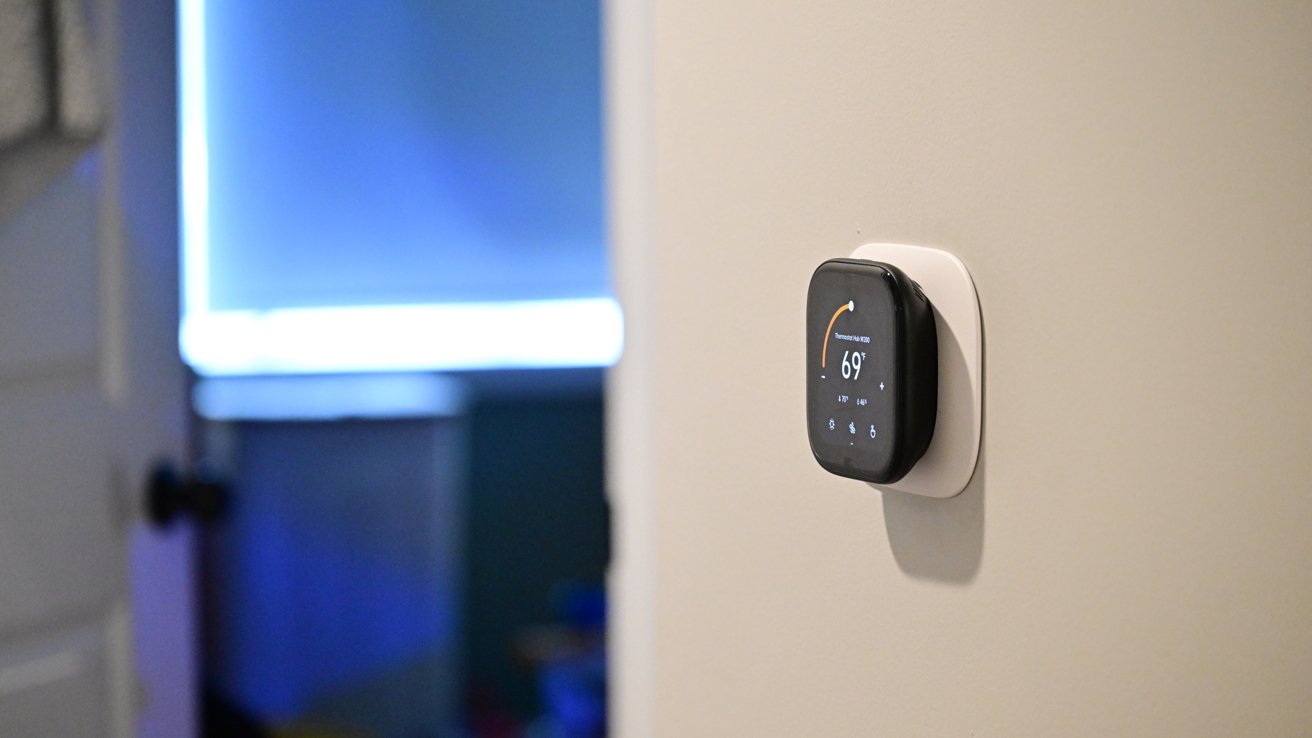
The Aqara W200 is a sleek-looking thermostat, easily catching your eye from across the room. It's a rounded square and includes an optional back trim plate that can cover a larger opening on the wall.
Aqara W200 thermostat review: You get (almost) everything you need in the box except a C-Wire adapter
For my install, I still had some legacy screw holes that I chose to hide. I could have spackled them and painted them for a cleaner look, but for that, I'd have to still have some of that original paint around.
If you aren't comfortable installing a thermostat, it's easy to find a handyman to do so, but it's not particularly difficult. That's especially true if you're coming from an old smart thermostat, as it's just an easy move of the wires from one bracket to the other.
Aqara W200 thermostat review: It took only a few minutes to complete the install
Going from my old Ecobee, I first turned off the breaker and then pulled my thermostat off the wall. I then took a reference photo and moved each of the wires from the Ecobee bracket to the Aqara bracket with the same label.
I had it installed in just a few minutes. If you need the C-wire power adapter, it is available as an extra purchase.
Aqara W200 thermostat review: I needed to use the trim plate to cover a larger hole
In my case, I didn't use it, but the Aqara app also walks you through this installation process. Each step is clear, and I think that most homeowners who consider themselves even a little handy can manage to get it hooked up in less than 15-30 minutes.
The thermostat isn't metal like Nest or Ecobee Smart Thermostat Premium, but it still looks good nonetheless. It's all black with a customizable 4-inch touchscreen on the front and a 480×480 pixel resolution.
From a distance, the screen nearly blends right into the body of the thermostat. On top are two grilles on the corners, as well as microphone inputs, used for two-way communication with a video doorbell.
Aqara W200 thermostat review: You have two themes to choose from
Currently, the W200 has two themes for users to choose from for appearance: classic or GleamCraft. Interestingly, they're labeled in the Aqara app as "free," possibly implying the ability to purchase additional themes in the future.
These themes change the general color scheme of the thermostat, while screensavers are what show on the screen when idle. As you approach the thermostat, the screensaver fades to the temperature interface.
There are currently seven screensavers to choose from, though I wish there were more. This is a longstanding grievance of mine with similar devices.
A software feature like screensavers is exceedingly basic. They just require a bit of design, but exist as a single interface screen and don't otherwise require many system resources.
Aqara W200 thermostat review: There are seven themes, but I still want more
I think that seven is paltry, especially considering one of them is just showing the weather. Three of them have bright orange and blue colors, while the only dial-based clock is gold.
In my home, I'm not looking for vivid colors on the thermostat, and gold doesn't match our decor. It may be nitpicking, but I'd love a few more styles, or at least the ability to adjust the colors.
The W200 is using mmWave radar to detect your presence and your approach. When it detects you walking up, that's what triggers the screensaver to go away or to wake the thermostat if the display was asleep.
Out of the box, my W200 was not triggering this properly, which I partially blame on its installation location. It's right around the corner, so I don't walk up to it head-on.
Luckily, this is a user-adjustable setting in the Aqara app. I could change the screen activation distance, and now it works perfectly.
Using the touchscreen is easy and intuitive. You see a large number representative of the current temperature and an arced slider showing the target temperature.