The Thunderbolt 5 docking station market is very crowded, but at a street price of about $350, the uGreen Revodok Maxidok 17-in-1 stands out, with an excellent price to features balance.
A laptop is a compromise between power and portability. The trade-off is usually ports, with thin notebooks like the MacBook Pro offering only a handful of connections.
A Thunderbolt dock solves that by turning one port into many. The Revodok Maxidok pushes that idea about as far as it currently goes, with Thunderbolt 5 speeds and a built-in SSD slot.
uGreen's dock lineup spans USB-C hubs through to Thunderbolt 5 models. The 17-in-1 sits at the top of the current range.
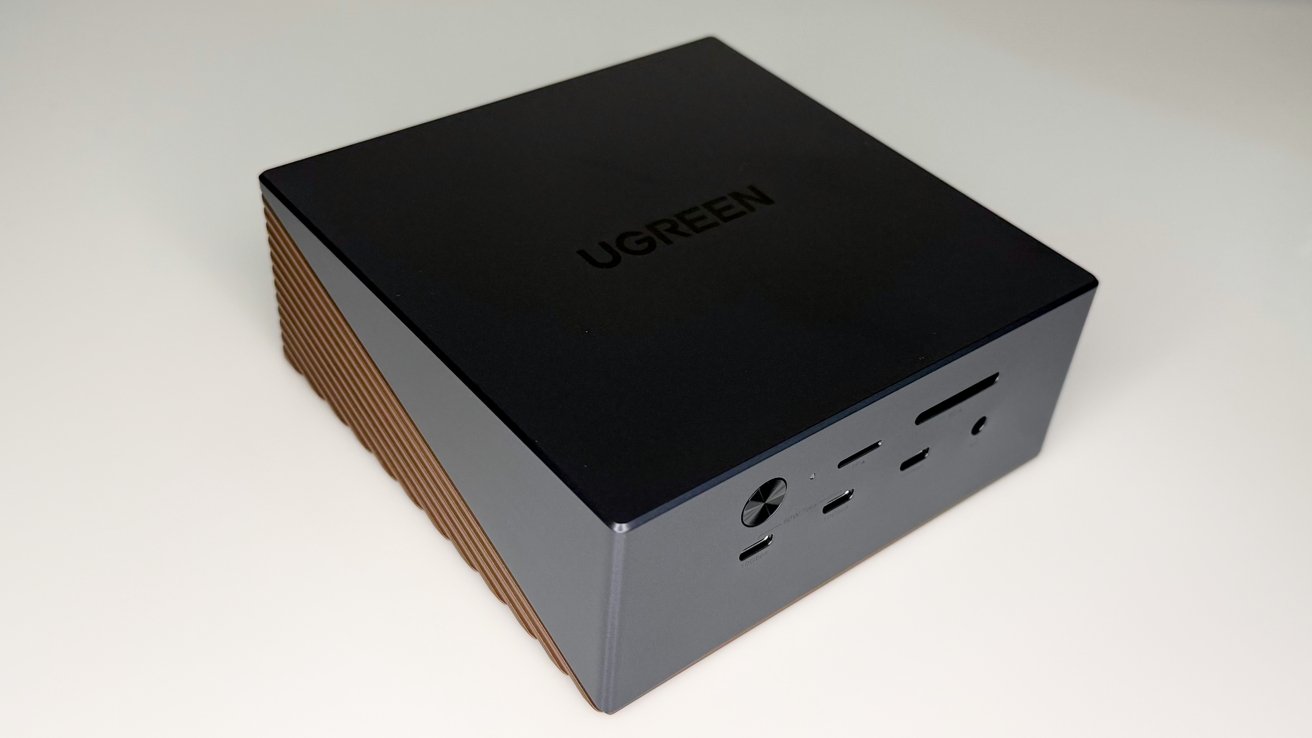
The Maxidok uses a two-tone metal chassis, with ports split across the front and rear faces. The front holds the most frequently accessed connections, while the back handles the permanent desk setup.
uGreen Revodok Maxidok 17-in-1 review: The box
On the front are three USB-C ports at 10Gbps, an SD 4.0 and TF card reader, a 3.5mm combo audio jack, and a power button. Power buttons are uncommon on docks, and it is a nice touch.
The rear carries the two Thunderbolt 5 downstream ports, the single Thunderbolt 5 upstream port for the laptop, and a DisplayPort 2.1 output. It also has three USB-A ports at 10Gbps, 2.5 Gigabit Ethernet, separate audio in and out jacks, and the DC-in for the power supply.
uGreen Revodok Maxidok 17-in-1 review: The front ports
Underneath is a cover, hiding the M.2 SSD slot for storage. We don't normally recommend getting faster drives for docks or network attached storage. The latest crop of Thunderbolt 5 docks is an exception.
Spend the extra money for a PCI-E 4 M.2 SSD. While you still won't quite get native speeds from the drive, when connected to a Thunderbolt 5 host, you will see more than 3 gigabytes per second transfer.
The headline feature is Thunderbolt 5, the host connection to the notebook. It supports data transfer at up to 120Gbps, which uGreen notes is more than double the bandwidth of Thunderbolt 4.
Thunderbolt 5 is the latest version of Intel's high-speed connection standard. Crucially, it is backwards compatible, so the dock also works with Thunderbolt 4, USB4, and older USB 3.x devices, just at their own lower speeds.
uGreen Revodok Maxidok 17-in-1 review: Rear port view.
For Mac users, this matters because the latest Apple Silicon MacBook Pro models with M5-series chips support Thunderbolt 5. Plugging into this dock would unlock the full bandwidth on those machines.
Older Macs with Thunderbolt 4 or Thunderbolt 3 will still work, but at their respective lower bandwidths. Obviously, the dock does not add capability the host Mac does not already have.
This only really matters if you're using the SSD, or need to connect three monitors through the dock, though.
The Maxidok can drive a single 8K display at 60Hz, or two 6K displays at 60Hz. There is one dedicated DisplayPort 2.1 output, with additional video carried over the Thunderbolt and USB-C connections. Adapt as you will.
There is also a caveat for triple-display setups. Extended mode across three screens is only supported on host laptops and computers with Thunderbolt 5 ports.
uGreen Revodok Maxidok 17-in-1 review: Small compared to its power brick and a Mac mini.
For Mac users specifically, the number of external displays a Mac can drive depends on its chip. Entry-level Apple Silicon chips have limited external display counts, so the dock's multi-display ceiling likely exceeds what some Macs can actually use, if you don't have a MacBook Pro.
I can confirm that the dock works fine on Windows. This is AppleInsider though, so that wasn't the main testing platform.
A key differentiator is the built-in M.2 NVMe slot. It accepts a PCIe Gen4 x4 SSD up to 8TB, and uGreen says it can be accessed without completely disassembling the dock, which is a nice change.
This effectively folds a fast external drive into the dock itself. For creative users working with 4K footage or other large files, having that storage built into the desk setup is convenient.
SSDs used for testing included a Samsung 990 Evo Plus drive and a Samsung SSD 9100 Pro 1TB drive.
uGreen Revodok Maxidok 17-in-1 review: You can add an M.2 drive for added storage.
The manufacturer says that transfer speeds peak at 6.2 gigabytes per second from the drive. That's never a real number, no matter what manufacturer is saying it.
In the real world, I got about 5.3 gigabytes per second from a M3 Ultra Mac Studio, which is close enough when compared to a manufacturer spec.