Owners of the Apple Watch can expect more than just Siri AI in watchOS 27. Here are 50 improvements for the wearable's operating system coming this fall.
Apple's main operating system updates, including iOS 27, iPadOS 27, and macOS 27 Golden Gate, are getting the bulk of the attention this cycle. That makes sense, as they're the ones most people will directly interact with every day.
That's also true in a year where Apple focused mostly on sorting out its artificial intelligence features.
But while Siri AI gets the eyeballs in iOS 27, there are still a lot of changes to investigate elsewhere. For Apple Watch users, there's a ton of changes in watchOS 27 that the public can use this fall.
Here's a rundown of many of the changes and features included in watchOS 27 that are accessible in the betas.
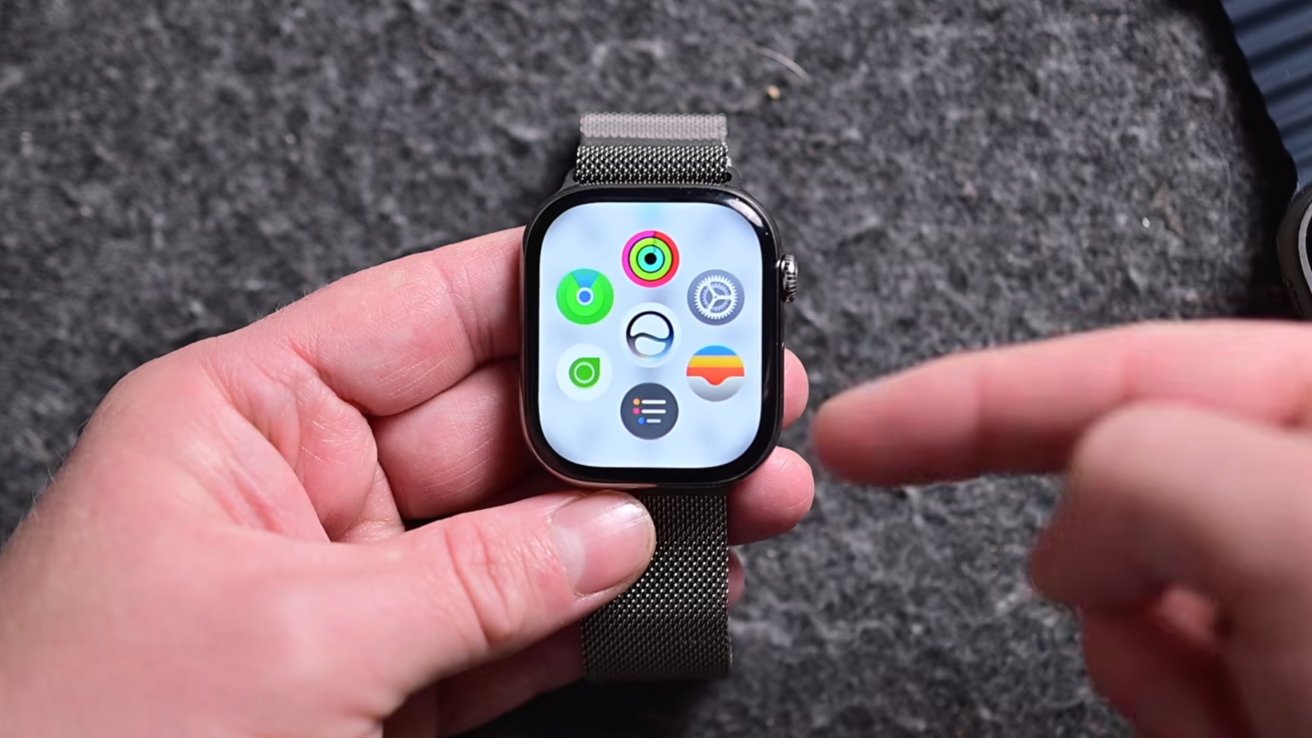
When you press the Digital Crown on the side, watchOS will launch into a new grid view that shows the Siri icon surrounded by other apps. There are five apps, with a sixth space permanently showing a list view.
These five apps are selected by on-device intelligence, depending on what it thinks you want to access. This will be based on various factors, such as time of day and your location.
From this Dynamic App Grid, you can tap the list view or scroll to access the full app list. You can still choose between grid and list view.
The middle of the Dynamic App Grid is the new Siri app, complete with a brand new appearance. Summoning Siri brings up a new glass ball with wavy elements, matching the rest of Siri's appearance elsewhere in the 27-gen ecosystem.
The new Siri app is a dedicated app that synchronizes across all of your Apple devices. You can start a conversation on one, and continue where you left off on another.
It's also capable of open-ended questions with follow-up queries, all in a natural back-and-forth conversational flow.
watchOS 27's Siri app includes synchronized conversations.
The big appeal of new Siri is personal context, as it will now determine data points based on conversations you've had with others, messages, and app content. The main example is it working out who relatives are and using that information in other ways, such as determining when a user's mother will be arriving at an airport.
If you have a lot of images with data, they can be sorted through for information. If you have a shot of your passport or drivers license in Photos, you can ask for your passport or license number, for example.
Siri is also much more capable of taking action in apps. You can more easily share flight details with your family or set a new goal for your Activity rings, all via Siri and without changing them manually.
The Smart Stack now gets more options, including a new gesture to navigate hands-free. A double-tap will move to the next item in the stack, with a single tap opening the item, and a wrist flick going back to the stack.
There are new suggestions available, including showing the option to wish someone a Happy Birthday. If you parked your car and are away from it, there will be a suggestion to help get you remember its location.
You can also change your sleep alarm before some major holidays. There are also warnings for loud environments.
There are options to pin some items, such as your transit card or ID for quick balance checks. You can also pin message conversations.
Workout Buddy no longer needs the iPhone to work. You'll get tips and notifications as you work out if you have the Apple Watch on its own.
It has also been improved, so Workout Buddy has more data to work from and inform you about. That means more health insights, such as how long you spent in Zone 2 or your pace progress.
Apple also says your health data will be a lot more accurate. This includes improvements to motion tracking algorithms to be more precise in tracking your walks and treadmill runs.
Sleep data in Apple Health now supports time zone changes. Step counts in the Fitness app now sync better with the Health app.
Cycle Tracking in Health now includes menopause and perimenopause support.
Apple has finally combined Find My into one app. Previously, this was three separate apps: Find Devices, Find Items, and Find People.
Tap in the top left corner to switch between the three.
The default view is the Map view. You can scroll, and the map will update to show each person or item in turn.
You can also swipe up to go to a list view, showing all tracked items.