We all kind of want to be Tony Stark, don’t we? Almost everyone can relate to that futuristic sense of wonder that comes from the movies where we see digital elements being interacted with through a simple wave of the hand. To date, that’s only really been replicable through big ol’ headsets like Apple’s Vision Pro or the various Meta Quest sets. But with XREAL Aura, Android XR brings that feeling to something far easier to actually use, but my one remaining question is who this product is for.
XREAL isn’t new to the mixed reality space. The company has been building some of the best example of optical see-through XR glasses. These aren’t quite like a VR headset because they actually let you see the world around you, not through a camera, but by simply making the lenses themselves see-through. I’ve tried these in the past and, while they’re great for mirroring a tablet or laptop for bigger screen (especially on airplanes), I did feel they were missing something.
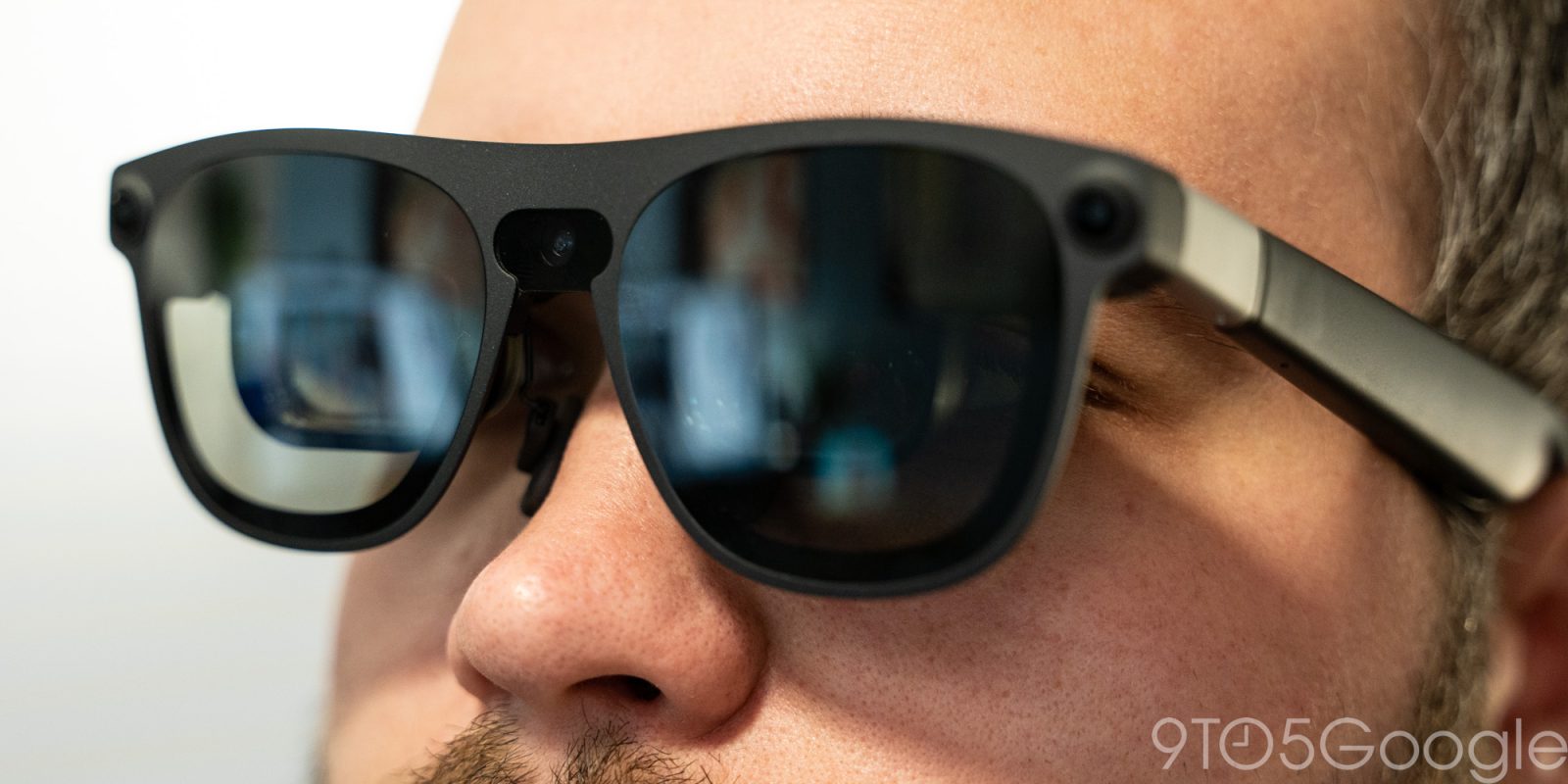
XREAL Aura is a two-part device. There are the glasses themselves which include two displays, one for each eye, and electrochromic dimming on the lenses to control just how much of the outer world you’re seeing. It’s wildly different from a typical VR headset, while also having most of the same benefits. Unlike most other XREAL glasses, Aura has built-in world-facing cameras used for hand and spatial tracking, as well as being able to be used as a camera for things like scanning QR codes, Gemini Live, or simply taking a quick picture (there’s no privacy light here, but the bulkier-than-normal design compared to standard glasses is more than enough a dead giveaway that the “perv glasses” dilemma doesn’t really apply in my opinion).
The other half of the formula is a wired puck that provides battery power and the brains of Android XR. There’s no screen on the puck, just a status light, and it has USB-C out for the glasses as well as USB-C in for power and/or external devices. It also has a fingerprint sensor (are you hearing this Android tablet makers??) and a touchpad, the latter used as a secondary, far subtler input method within Android XR to supplement hand tracking.
Together, these two make a wonderful package for building a true mixed reality experience. The displays are plenty bright for even the brightest indoor conditions (frankly, it’d be insane to use these outside in my opinion, though a wide-open plane window may present a challenge), and the electrochromic dimming does a great job of blocking out most, but not quite all of the world around you. If you’re looking to be fully cut off from reality as you would with a VR headset, these aren’t for you. I did find some display elements, like smaller text, a little tough to focus my eyes on at times, but I have a feeling that’s more so me being overdue for an eye exam than it is the glasses themselves. There’s virtually no flicker in my usage, with only bright white backgrounds occasionally being a little overbearing, and everything is smooth with the 120Hz refresh rate.
Where this hardware really shines compared to a typical VR headset is in its design, and it’s what makes XREAL a perfect partner for Android XR. The glasses themselves weigh in at 95 grams, a mere fifth of the Meta Quest 3 and Samsung’s Galaxy XR, and up to 700 grams less than Apple’s Vision Pro. It’s comfortable for much longer periods of time and not nearly as annoying to actually put on either, as it just feels like putting on a pair of bulky sunglasses. They look a little goofy, obviously, but far less so than a full-on VR headset like any of those mentioned above. This is also the only one of those I consider “mixed reality” thanks to the see-through lenses. Apple and Samsung constantly talk about Vision Pro and Galaxy XR as if they’re mixed reality, but a camera feed is explicitly not true reality. But XREAL’s glasses still aren’t quite just augmented reality, because they’re not just letting you see that digital world through a tiny window, they’re quite literally overlaying everything on top of the real world around you. The illusion is somewhat broken by the limited 70-degree field-of-view and the fact that darker backgrounds often look a little funky when there are light sources in the real world in front of you, but I can say with confidence that this is my favorite version of this experience – the speakers are pretty good too, topping it all off.
Google’s platform launched on Samsung’s Galaxy XR headset earlier this year, and it’s all pretty familiar on XREAL Aura. The Android-based experience opens up to a floating launcher of your favorite apps that mostly open up into floating windows in front of you. You can use hand gestures to move everything around or interact with UI elements, and every app I tried worked perfectly well. The gestures can be hit or miss at times, especially the one for going back to the home screen (having this as a long-press that you have to physically look at your hand for gets annoying when doing anything remotely fast-paced, but thankfully the top button is a dedicated home shortcut), but it works well and everything is designed fairly intuitively. A floating cursor shows where you are aiming with a pinch acting as a tap on a touchscreen, and you can move things around in your space as if they’re real objects. There’s a sense of depth throughout the entire experience.
Some apps open to fully immersive experiences, but these are still in the minority. XREAL touts that there are around 150 experiences launching alongside Aura, but it’s definitely still early days here. Apps like Google TV should obviously be ready for a full format like that but, most things, like the Google Docs app which I’m typing this review in right now, just act as if they’re on independent displays floating around you.
Like Googlebook, Android XR is also still struggling to figure out the best app experience for each user. Most things are mobile apps, including Google Chrome which is just the standard Android version from your phone. It’s fine in most cases, but I found this restrictive seeing as I can get a ton done in a browser, but fighting mobile optimization is a frustrating way to interact with a window that can be as big as a TV if you want it to. Meanwhile, the Spotify app is weirdly the web version which is horribly optimized for interacting with hand gestures. I’d have rather had the mobile version here. Another quirk I found was notifications, which pop up at the top of the display and quite literally on top of whatever you’re doing. Something they were invasive, and having to physically reach out to dismiss them is a little annoying. I’m sure there are workflows to help make this less of a distraction, but I’d almost rather have notifications turned off entirely.
There’s also Gemini, which is core to the experience here. A quick “Hey Google” triggers a Gemini Live session for answering questions, and you can share what you’re seeing to give additional context. It’s way faster than switching between apps to get a quick search done, but there are friction points here, especially if you’re just asking a single question. Gemini answers quickly and leaves the conversation going, great for follow-up queries, bad if you’re done because the UI controls go away, which leaves you to tell Gemini to end the session which, every time, it asks for secondary confirmation you want to end. Google, if I say “end the session,” I think that should be more than sufficient proof I want to end the session. Luckily, a long-press of the top home button fixes that headache, but I still hate that I either need to use a physical control, or basically have to fight an AI to end a conversation that I started hands-free.
Performance is excellent. Everything is smooth and quick, probably thanks in part to XREAL’s use of 12GB of RAM alongside Qualcomm’s Snapdragon Reality Elite chip.
But how do you actually use a product like this?
That’s the question I found myself asking when I first spun up XREAL Aura and started to learn its ins and outs. See, other XREAL glasses have an extremely straightforward use case. Plug in the external device of your choice, get it on a bigger screen. Simple, easy, obvious. I found this helpful in travel primarily, with a bigger display for my MacBook feeling nice for tasks like video editing, while the main value came in just having a very comfortable way to watch a movie on a flight from my connected tablet.
Both of those use cases are valid on XREAL Aura. You can plug a USB-C device into the puck to get that wired mirroring through an Android XR window, and it works super well. Having Android XR alongside that mirroring also opens the door to added functionality, like having extra windows off to the side for perhaps a media app or reference document if you run out of room on the wired device. As just one example, I kept Spotify and Slack open in side windows while using Aura with my MacBook Air for an afternoon of writing articles.
I think Android XR makes Aura an absolute powerhouse for media consumption, as you can just download content directly to the device (256GB of storage in the base model) for a flight, or even just use streaming apps if you have Wi-Fi. I couldn’t find any 3D content during my brief review period (nothing in my Google TV library was compatible, apparently), but that’s also on the table. Genuinely, I cannot wait to use these on my next long flight.
But outside of those, I think a lot of the other scenarios start to fall apart.
By far the most popular use case for virtual/mixed reality has been gaming. XREAL Aura has a ton of potential here and I’m really excited to try out Project Hail Mary: Journey to the Stars on this, but the fact that these are simply glasses restricts a lot of what you can do. Any big movements could easily result in the glasses slipping or even falling off, whereas a VR headset is much more secure. Stationary immersive gaming has potential, and XREAL’s Gamesir controller collab shows promise, but I’m just not sold on these as a replacement to something like Meta Quest seeing as the latter already has a deep catalog of games and a much more affordable price.
The other use case is productivity, one I’m also not entirely sold on. As mentioned, this entire post was written in Aura, and I’m not sure I benefitted much from that experience versus just using a normal laptop or desktop computer. My workflow was having Google Docs up in the center, typing on a physical keyboard (only a psycho could use the virtual keyboard for anything beyond the shortest messages or passwords) with reference documents in Chrome off to my right and Slack on my left, with the occasional “Hey Google” command helping to find information on the fly (such as the weight comparison earlier). It all works well, but I think Android XR is inherently limited by its reliance mostly on mobile apps, and also just by the use of gestures. You can use a mouse or trackpad, of course, but at that point you might as well just use a laptop.
XREAL Aura is for a very specific customer from my point of view. Wired mirroring is still very much the strong suit here, with Android XR’s apps and offline video giving these utility outside of just relying on another device. That was my problem with previous XREAL glasses, because the experience just varies wildly depending on what’s connected. Aura’s puck and Android XR experience solves every complaint I had about previous models, while expanding very much on what it can do.
Further limiting matters is the price. $1,279, in my book, is actually a mostly fair price for this, especially given the RAMageddon of it all. XREAL 1+ Pro come in around $600 and is utterly useless without a secondary device. XREAL Aura more or less doubles the price, but includes the best possible version of that secondary device while also giving you the added camera sensors that are only available as add-ons for other hardware. Don’t get me wrong, it’s still pricey, but I don’t think it’s unfair either, especially not when one of the main competitors for this sort of experience is still $3,600 (which still sounds insane two years later, even for Apple).
We’ll have far more to say about XREAL Aura in a long-term review from our Nick Sutrich, but the verdict on day one is that Android XR has really solved the biggest problem for XREAL, while XREAL has solved a lot of big problems for Android XR, all while being an overall win for the user at the end of the day. Not so often we get a storybook ending like that in tech anymore, and I’m all here for it.
Don’t forget, XREAL Aura is $200 off – so $1,099 – through the end of December. Much more worth it at that price.
Follow Ben: Twitter/X, Threads, Bluesky, and Instagram
FTC: We use income earning auto affiliate links. More.
Check out 9to5Google on YouTube for more news:
Find him on Twitter @NexusBen. Send tips to schoon@9to5g.com or encrypted to benschoon@protonmail.com.