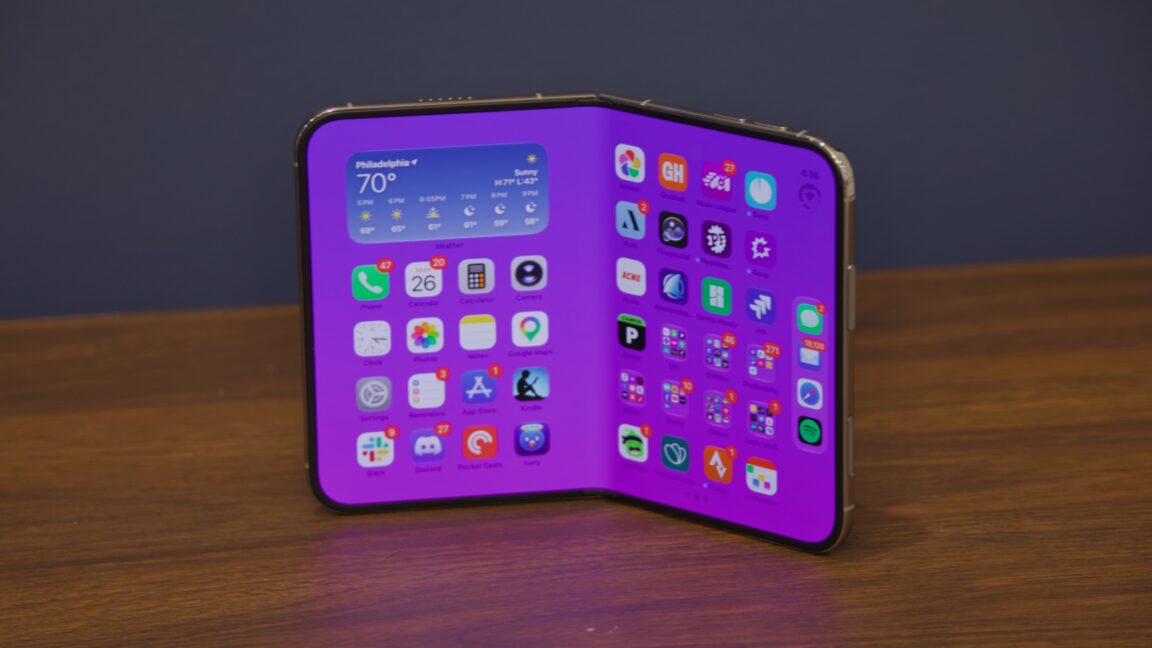
I understand the appeal of foldable phones—they let manufacturers keep expanding screen sizes while still producing devices that can reasonably fit in a pocket. In practice, though, every foldable Android phone I’ve seen in public has had a ridiculously visible seam between the two halves of the screen, often with what looks like delamination from the underlying surface, giving the display an ugly, bubbly appearance.
Back when Android phones began shipping with bigger and bigger screens and the iPhone was stuck at a miserly four inches, I was jealous. But I’ve never looked at anyone using a chunky, fragile-looking foldable phone in public and pined for Apple’s take on the idea.
Nevertheless, that take has arrived, in the form of the iPhone Duo. This $1,999-and-up foldable is the biggest change to the iPhone in years, with both hardware and software updates that dramatically change how you interact with the device.
Like most Apple products, it looks and feels solid, and Apple has managed to engineer its way around at least some of the problems that have bedeviled other foldables (in particular, it has wrangled the between-screen crease so close to invisibility that I rarely thought about it while using the phone unfolded).
But like most first-generation Apple products, it has some odd rough edges and costs more than most people will want to spend. Some aspects of its design feel like steps backward from the standard iPhone design, as exemplified by the current iPhone 17 and iPhone 18 Pro.
The result is something that is technically impressive but not always enjoyable to use. As a little iPad, it’s surprisingly good. As an iPhone, though, I struggle to think of a single way I prefer it to a regular old iPhone.
The iPhone Duo is the first iPhone I’ve used in a long time that comes with a learning curve. It’s the first time since 2018’s iPhone X that a hardware update has fundamentally changed how you interact with the software.
For the first day or two, I found this pretty off-putting. I kept losing track of the iPad-style button-mounted Touch ID sensor and flipping the phone around with the camera upside down. When fully opened, the phone acts like an iPad: It’s orientation-agnostic, and it will work in portrait or landscape, regardless of which end is up. But in its folded one-handed mode, the Duo still has a right-side-up and an upside-down just like any iPhone, and it took a couple of days of retraining my muscle memory before I was consistently pulling it out of my pocket and looking at it the right way without thinking about it.
When folded up, the iPhone Duo has a more compact footprint than Apple’s other phones and a screen that’s both shorter and wider. The titanium frame looks and feels a lot like last year’s iPhone Air, which plenty of people (us included) pegged as a half-step toward a foldable design. The outer screen looks and feels like a typical glassy iPhone screen, and the “back” of the phone where the camera is (the only quadrant of the phone that isn’t a screen) uses familiar-looking and -feeling Ceramic Shield glass.
Despite having a familiar-looking camera cutout and Dynamic Island on the front screen, the Duo totally lacks a Face ID scanner, which is a pretty big behavioral change following years of face-scanning phones. The Touch ID button has been migrated to the power button, iPad-style, which is in the upper-right corner of the phone when it’s folded (when unfolded, the positioning depends on which direction is “up” because the phone flips its screen orientation no matter which way you’re holding it).
In general, the Duo’s button positioning is strange. The power button’s position is… fine. It’s the only placement that makes Touch ID authentication even remotely possible with one hand, even though I felt like I was about to drop the phone every time I tried. But the volume buttons are on the top of the phone in this mode. The left button is volume down and the right button is volume up in this orientation, like on a landscape iPad, even though the volume indicator itself is a tiny bar that lives in the Dynamic Island and travels up and down vertically.
The Duo’s other physical button is the Camera Control button. I would vastly prefer it be a customizable Action Button, which I use constantly on my iPhone 17 Pro. For a phone with this many acres of edge, it feels like the Action Button should have room to exist somewhere, but it doesn’t.
That shorter, wider screen leads to the biggest and most noticeable of the iPhone Duo’s software design changes, at least in folded-phone mode: Your dock moves to the right edge of the screen, and that’s where most app controls move, too. Controls for apps that normally appear on the top or the bottom of the screen are now generally relocated to the right side of the screen, which is still something I’m still getting used to, even after nearly a week of daily use.
These side-mounted controls feel like they’re swimming upstream against almost two decades of smartphone app design—and they don’t even really solve the “lack of vertical space” problem because as soon as the iOS keyboard pops up, the viewable area still shrinks to just a few lines of text.
This right-hand navigation area also feels weirdly underutilized, given the percentage of the front screen it takes up. Your dock is there, but Apple still limits it to four icons, leaving a ton of unused space above and below it. The nav area feels too wide, with too much negative space.
In the end, I only really liked the Duo in folded-down phone mode when it was sitting on a desk, couch, or table next to my laptop, serving as a separate compact notification screen—in other words, when I was not actively holding or touching it. And this isn’t something no other phone can do; it’s just a regular phone thing that the Duo doesn’t make worse.
While folded, the Duo is fundamentally designed for right-handed use. Controls throughout iOS and Duo-optimized apps have been scooted to the screen’s right edge to make up for the loss of vertical screen area. The screen is wide enough that any attempt by lefties to reach across with their thumbs to tab that part of the screen will be difficult to impossible, and I say this as someone with fairly large hands.
The Touch ID sensor—integrated, iPad-style, into the phone’s long, flat power button—is also mounted on the right side. Even if iOS did flip around the other way when you hold the Duo with the rounded edge on the left (and it doesn’t, to be clear), the camera would then be on the bottom of the phone, blocked by your fingers.
But even as a right-hander, I don’t find the Duo to be especially comfortable to use one-handed. Sure, I can reach everything, but the phone is so heavy and thick that the standard “rest the phone on my pinkie and use it with my thumb” move is fatiguing. A left-handed friend who held and tested the Duo found it extremely uncomfortable, particularly the stretch you need to do to hit any app icon in the side-mounted dock.
As frustrating as the Duo is when it’s folded, I genuinely enjoy it when it’s unfolded. Think of an iPad Nano, and you’ll be pretty close to what the experience is.
To answer the biggest question first: Yes, you can see and feel the seam between the screens if you’re looking for it. But most of the time, if you’re just holding it and watching video or reading a webpage and using a thumb to scroll in the corner of the screen, you just don’t notice it. Apple has gotten very close to making it invisible.
Frankly, I’m much more bothered by the under-screen camera, which is visible pretty much constantly. The seam is visible from some angles if you go looking for them. The under-screen camera pinhole is only invisible from some angles if you go looking for it. It’s out of the way enough not to be experience-ruining, but I did find it distracting, and I don’t know that I find it to be a net improvement over the actual-pinhole-with-Dynamic-Island solution that Apple has used for the last few iPhone generations.
When unfolded, the Duo’s screen expands from a squat 5.4 inches to a more comfortable 7.6 inches, which isn’t so far off from the new iPad mini’s 8.5-inch screen. The dock is still limited to four app icons, like a regular iPhone, but it moves back to a familiar place at the bottom of the screen, and apps have more room to breathe.
In landscape, apps usually retain the same side-mounted controls you see on the phone’s front screen, but when you pivot to portrait mode, they revert to more familiar positioning at the top and bottom of the screen—portrait mode looks pretty much like an iPad, while landscape mode looks more like a pair of iPhone home screens next to each other (more on that in a minute).
The inner screen has a matte nano-texture finish, which shares a name with the technology used in some Macs and iPads. But Apple says that both the materials used and the actual nano-texture pattern are both different, changes that were necessitated by the fact that this is a foldable phone and not an inert glass slab. A slightly raised rim around the edge of the screen keeps it from resting directly on a table or desk and leaves room for tiny bits of dust or crud to get trapped without grinding into the screen. If the inner screen does get damaged, this cover layer can apparently be removed and replaced without too much trouble.
I find the screen mostly pleasant to look at and interact with, and I really appreciate the lack of glare. My only gripes are that it picks up smudges that are slightly harder to wipe off than they are on regular glass and that contrast (particularly for dark/black elements) is visibly worse than on the front glassy screen. The inner screen does use OLED display panels, the same as the front screen, but this specific benefit of OLED is missing from the inner screen.
While an unfolded Duo is decidedly iPad-like, it’s still running iOS, not iPadOS, and Apple has gone back to the drawing board for yet another take on split-screen iDevice multitasking. What the company landed on is most similar to the iPad’s old Split View interface, but with some limitations and benefits that help it feel somewhat more at home on the Duo.
To enter split-screen multitasking, open an app and swipe up from the bottom of the screen, then drag the window to the areas that appear on the left and right of the screen. Once you’ve anchored an app in this way, the unused half of the screen simply becomes a standard iPhone home screen, with all your icons, widgets, and the side-mounted dock (which can appear on the left side of the screen when the phone is unfolded).