Apple Home users demand accessories that enhance their ecosystem and SwitchBot appears opposed to doing so, even if products like Lock Vision Pro are more than capable.
When SwitchBot reached out to ask me to conduct a review of some of its products, I was excited. The company has been releasing increasingly interesting products in recent years, and I was eager to see how they'd integrate with my Apple Home.
The problem is, beyond supporting Matter, SwitchBot doesn't acknowledge Apple's ecosystem as little more than an afterthought. The SwitchBot Lock Vision Pro is a smart lock that shows up in the Home app, but that's the extent of its abilities.
Don't get me wrong, the lock works great, as I'll detail in a moment, but the lack of support for my specific ecosystem features makes it an immediate no-go. If you're an Apple Home user, I find it difficult to recommend SwitchBot accessories of any kind, especially the Lock Vision Pro.
If you're more platform agnostic, rely more on Matter through third-party apps, or are already invested in SwitchBot's ecosystem, then read on. Apple Home users need not apply, but feel free to continue reading to hear exactly why.
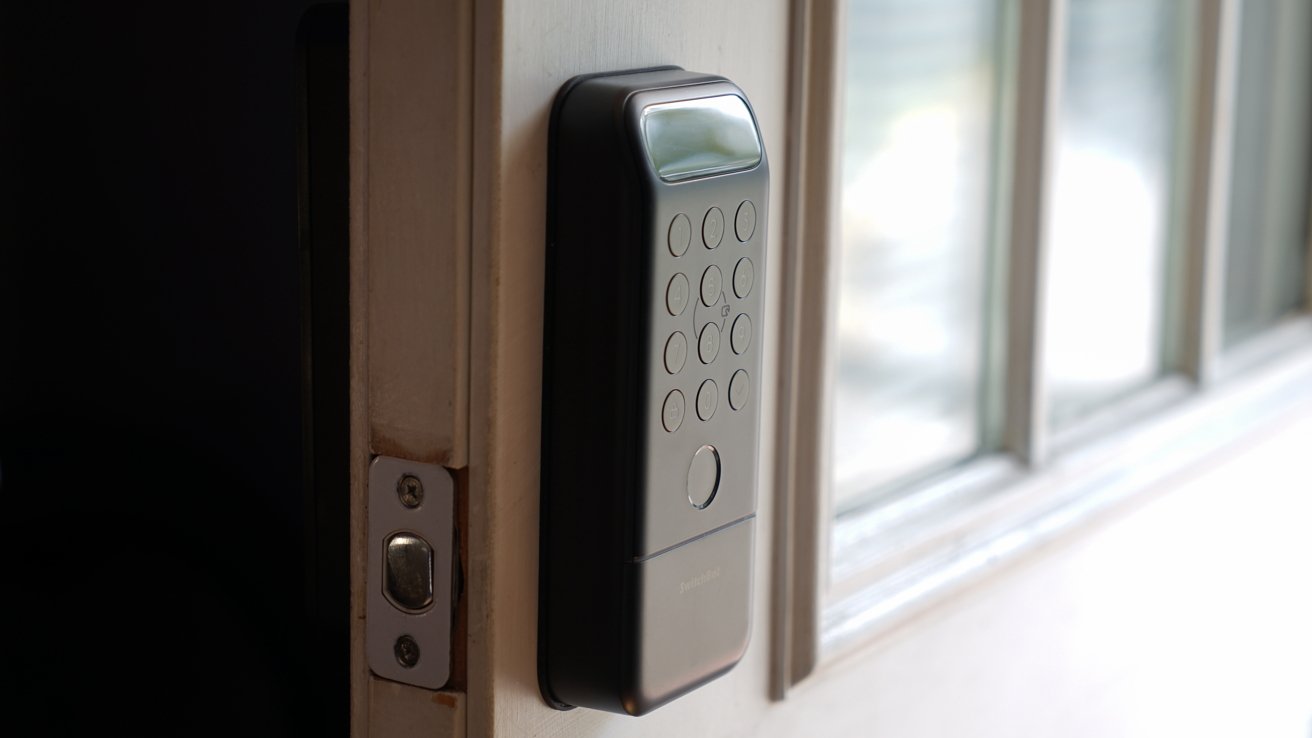
The SwitchBot Lock Vision Pro completely replaces the deadbolt in your door. It's a large mechanism that could impact your door handle or other aspects, so measure before you buy.
SwitchBot Lock Vision Pro review: A thick lock to fit all of the features
Installation is simple, but pay attention to how the gasket material is positioned or it could stick out awkwardly. It supports a door thickness of 1.4 inches to 2.2 inches and you'll need at least 1.8 inches from the knob.
The inside shows a simple lock mechanism while the outside is a number pad, thumbprint scanner, and scanning area for the palm and face recognition features. Slide the bottom plate down to reveal a physical keyhole.
SwitchBot says there are ten unlocking methods: face and palm scanning, fingerprint, keypad, NFC, geofence, app, voice, widget, and key.
Three are biometric, four are related to your iPhone, and three are a bit more old-fashioned. I didn't set up NFC fobs or cards, nor did I ever bother with the physical key.
SwitchBot Lock Vision Pro review: biometrics, pin codes, or physical keys
Honestly, a lock having multiple ways to be unlocked feels less secure. I know it provides the user peace of mind in case of one of the other methods failing, but still.
I personally would prefer a deadbolt that had only one option to unlock, and that's Apple Home Key. Which, technically, is four ways to unlock if you use SwitchBot's counting method: Siri, NFC, app, and widget.
Yes, no physical key would be preferable. However, that isn't this lock and not the audience SwitchBot is trying to target.
I've set up fingerprints, faces, and palms for my wife and me. The lock also appears in Apple Home, and that tends to be the primary way we interact with the lock.
SwitchBot Lock Vision Pro review: face and palm scanning work fine
Even if it isn't my preference, I appreciate having the biometrics available. I've never used the palm recognition, and the face recognition almost never kicks in, so I almost always end up using the fingerprint sensor.
The reason the face recognition likely never kicks in is because the lock sits behind a screen door. Normally, approaching the lock would wake it and scan my face, but the sensors are obscured by the closed outer door.
By the time I hear the voice telling me where to stand, my finger is already on the fingerprint.
SwitchBot Lock Vision Pro review: screen doors stop walk-up preparation from working
If you've got an unobstructed deadbolt set up so the lock can see you as you approach, the Lock Vision Pro will likely unlock before you can reach up. For my setup, the face recognition is wasted.
The internal battery is rechargeable and replaceable. A single charge lasts 12 months while a backup CR123A backup battery works even in frigid -4 F temperatures.
Since the battery is located on the inner portion of the lock, battery failure due to temperature should be rare. There's even a USB-C port for emergency power that bypasses the battery in case of an emergency.
SwitchBot Lock Vision Pro review: rechargeable battery plus battery backup
It's a Wi-Fi connected lock with Matter support, which means you won't need a SwitchBot hub to connect it to Apple Home.
All of the features are accessed and controlled through the SwitchBot app. The only thing you can do in Apple's Home app is lock and unlock the door.
I'm sure you're already tired of my chief complaint with this device, but it's a thorn in an otherwise amazing product. I like the design and feature set, even if it isn't a perfect match to my preferences.