While the Thunderbolt 5 Wokyis G7 dock certainly goes after the retro gaming nostalgia vote, it also happens to be a well-thought-out add-on for your Mac Studio or older Apple Silicon Mac mini.
I am not a stranger to Mac docks. I suspect between myself and the rest of the staff, we've done the most reviews of them out of anybody facing the internet over the last decade.
Previously, we looked at the Wokyis M5 Dock, which turned a Mac mini into a Snow White design ethos compact Mac thanks to a clever enclosure and a built-in display. One year later, we're looking at another similarly styled dock that aims for the same blend of utility and retro vibes.
The Wokysis G7 80Gbps is another dock designed to sit on top of your Mac. This time, on top of a Mac Studio or the older M1 and M2-era Mac mini.
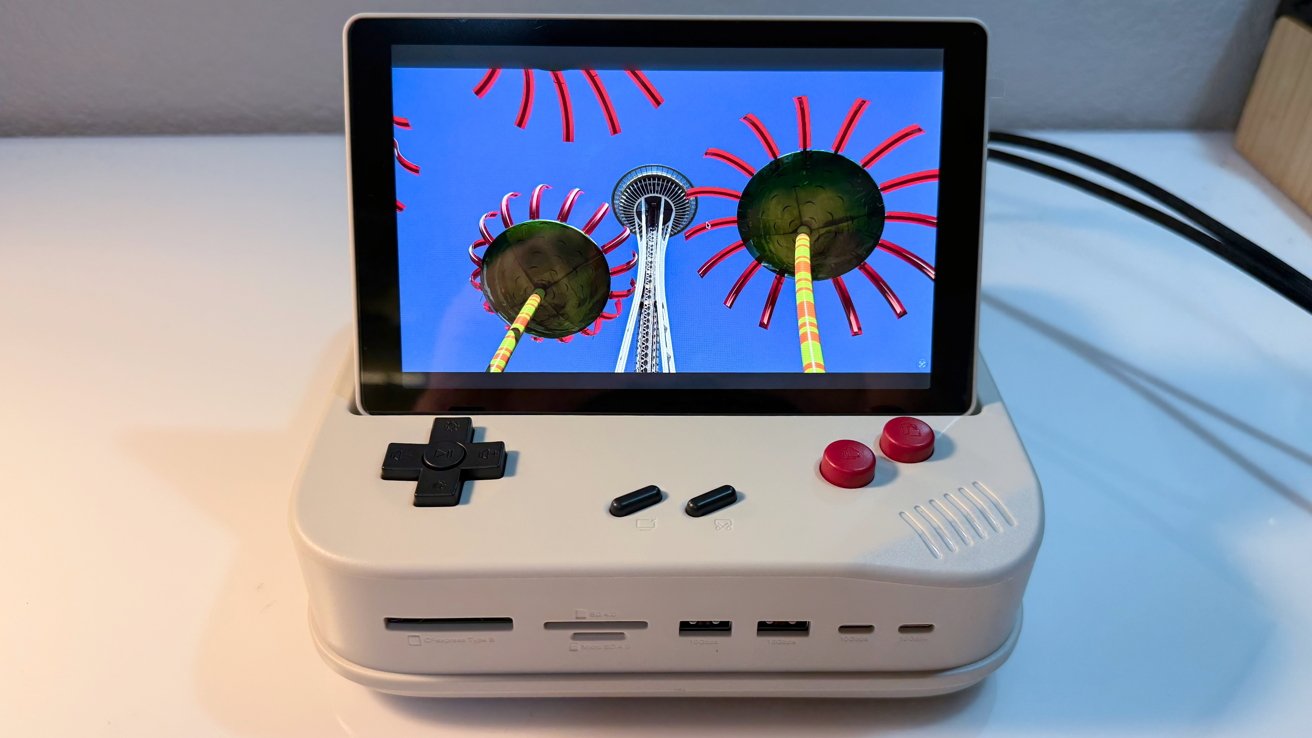
But rather than resembling an old Mac, it instead plays on gaming themes. Specifically, that of the original Game Boy.
And, it does this while still trying to provide as much utility to modern users as possible.
Most docks hide under a monitor or behind a desk. The Wokyis G7 wants to sit out in the open, on top of a Mac Studio.
The device is designed to be a hat for the Mac Studio or the Mac mini with the same footprint. It connects to the back of the Mac using a supplied Thunderbolt 5 cable, that honestly, could be a little shorter.
I think that's the first time I've ever wished for a shorter Thunderbolt cable to come with a dock.
Wokyis G7 review: Beside a Mac Studio for scale
Like other docks, it's got ports on the front and rear, and there's a well-hidden slot for an M.2 SSD to be attached.
The styling mimics the original Game Boy. Obviously, it's only in homage to the console with enough changes to keep Nintendo's normally vicious lawyers at bay. Just ask Switch emulator developers how that goes.
There are also a series of buttons, which gives it the overall appearance of a stylized miniature arcade cabinet.
There is obviously a lot of novelty value here, but there's a lot more than just something that makes you think about games from the 1980's and 90's.
The build quality is solid. Think Star Wars toy plastic, not Lego, though.
This is not something that needs aluminum all over, but the SSD cover is metal to act as a heat sink. There are sticky heat sink pads in the box, and all you need to do is add your own M.2 drive.
The main visual element is obviously the display on the dock itself.
The previous novelty dock from Wokyis, the M5, also had a display, and did a lot more to serve the styling of the peripheral than it does here.
At a resolution of 1,280 by 800, it's not intended for you to do work on.
Wokyis G7 review: The display can flip up to look like an arcade cabinet.
You could use it as a secondary display, though. It can also be employed as a digital photo frame, a clock, or a way to watch shows in the background instead of using your iPad.
There is the obvious temptation to use it for gaming due to the dock's styling. You certainly could try, but you can't and shouldn't rely on those buttons to control your actual gameplay.
A real game controller is always going to be better than this. And cheaper.
Those buttons are actually a selection of one-touch keyboard shortcuts, complete with little icons explaining what they do.
Wokyis G7 review: Screen is laid flat. Those buttons are actually usable.
The D-pad handles brightness, volume, and media playback. The two red buttons are copy and paste, and the middle two are for putting the Mac to sleep and taking a screenshot.
This is a fairly handy way to make the dock a little more useful, like a simpler form of a Stream Deck or other macro pad.
If the display is taking a bit too much vertical space or you need to store it, you can flip it down. It's not perfectly flat, but that's okay.