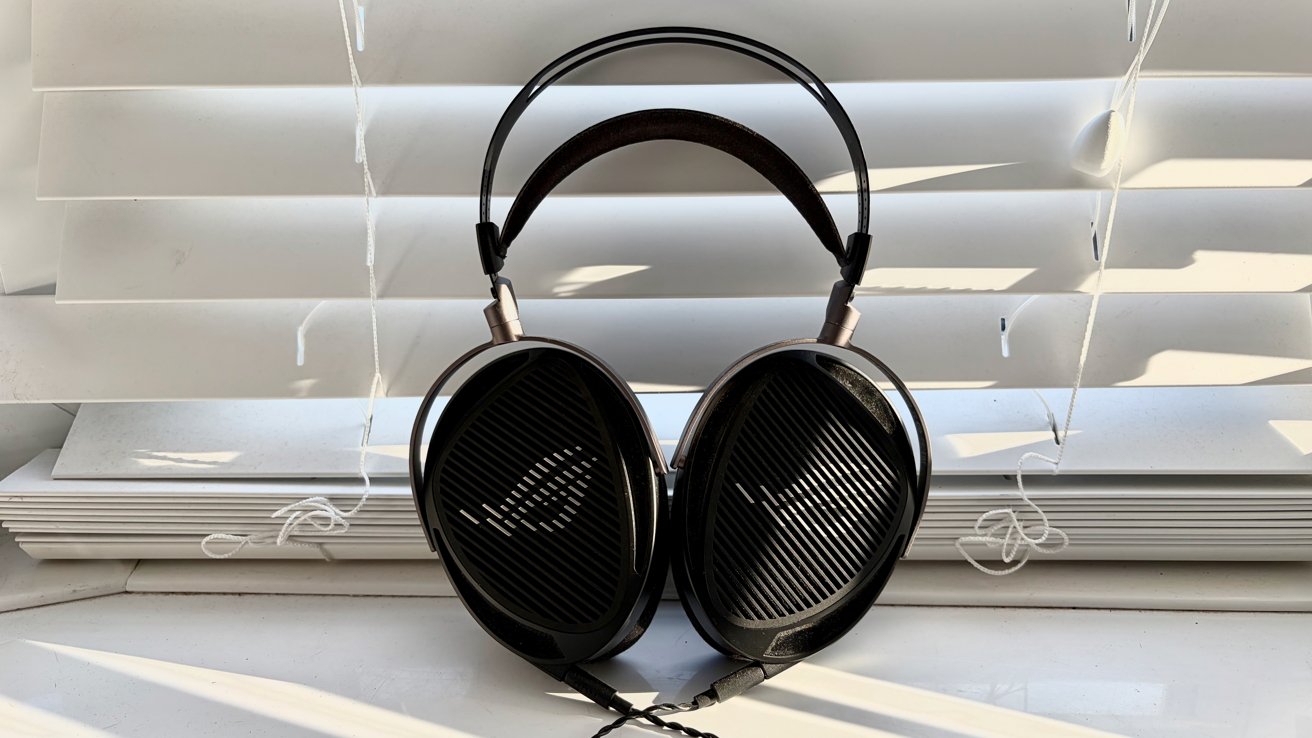
The Asus ROG Kithara brings Hifiman's planar-magnetic drivers and signature design to the Mac gaming world with aplomb that's sometimes undermined by unfortunate complexities.
In a world that's full to the brim with mediocre gaming headsets, this Asus ROG and Hifiman collaboration is certainly different. Hifiman is known for its premium headphones aimed squarely at audiophiles with plenty of money to spend on their hobby.
By contrast, gamers aren't known for their willingness to part with their hard-earned cash. Unless it warrants it, that is. And in the case of the Asus ROG Kithara, their $300 would be money well spent indeed.
I've spent the last few months with this headset (or headphones, depending on how you look at it.) I've used it to play some great games and listen to some not-so-great music. Go West fans shout out in the comments. I can't be the only one.
In all that testing, one thing has become clear. Asus and Hifiman have made a great pair of headphones. Whether they made a great gaming headset will depend on how you plan to use it.
The first thing that you notice when unboxing the Kithara is its gargantuan size. It's easily the biggest headset or headphones I've ever used, but with good reason. The size is dictated by the technology.
The technology in question is Hifiman's 100mm planar-magnetic drivers, something that dictates both the size and quality of the Kithara. Apple's AirPods Max 2 have custom 40mm drivers, just to put that into perspective.
ROG Kithara review: Hifiman's planar-magnetic driver is huge
Hifiman's huge drivers are the reason for the Kithara's mammoth ear cups, and part of the reason for the headset's 420-gram (14.8-ounce) heft. The other reason is the metal construction. The headband is paired with an oversized metal structure that looks incredibly odd to anyone not wearing it.
The good news is that the band does a good job of distributing the weight across the head. The open-backed design of the ear cups also helps make for a more airy feeling than you might expect when you first see the sheer size of the Kithara.
Buyers of the Kithara will receive two pairs of ear pads in the box, offering a little customizability to proceedings: one set with thick memory foam for cushioned comfort and a faux leather finish and another, slightly smaller pair that features a lighter, cooler mesh material.
A lot of premium gaming headsets are wireless, and that's something that many gamers have come to expect. The Kithara takes a different approach, using a wired connection that ensures it can be used with just about any device you choose to play.
But this wired approach is where some of that complexity first comes into play. The Kithara comes with not one, but two cables in the box, each designed for different use cases.
One of the included cables incorporates a flexible microphone designed for multiplayer gaming. The second cable is for those who don't need the microphone because they're listening to music or playing a single-player game.
Each of the Kithara's earcups has its own 3.5mm socket, so each of the cables connects to each cup separately.
The cable with the microphone also has an inline volume control and the option to mute the mic when needed. The other end of the cable terminates in a pair of 3.5mm connectors; one for audio, one for the microphone. There's also an adapter that takes both of those connectors and converts them into a single USB-C connector.
This is another area where the Kithara is more complicated than I'd like. Plugging the headset into a PS5 or Xbox is as simple as plugging it straight into the controller.
But if you also want to use the microphone, you're left with connectors for both audio and the mic itself. Controllers only have a single 3.5mm socket, which is a problem.
There are different workarounds depending on which console you own. PS5 owners can use the USB-C adapter, so long as the cable is long enough to reach its destination.
ROG Kitahra review: It's hard to miss the ROG branding.
Xbox owners will need to buy a TRRS adapter that combines the audio and mic connectors into a single 3.5mm one. They aren't expensive, but it's a complication that needs to be considered if you're an Xbox gamer.
The standard audio-only cable is clearly the one that buyers should use if they don't need to use the microphone. If only for its flexibility.
This cable also connects to the headset via two 3.5mm connectors, but it's the other end that's interesting. It features a 3-in-1 connector that turns into any of the 3.5mm, balanced 4.4mm, or 6.3mm connectors that are included in the box.
This approach adds flexibility, allowing the Kithara to be used with consoles, PCs, and Macs as well as DACs and amps.
I tested the Kithara headset with a variety of devices, but it spent most of its time connected to my 16-inch M4 Pro MacBook Pro, the family's Xbox Series X, and our PS5. I used both of the cables and tested the microphone while playing multiplayer games like "Marathon."
In terms of audio quality, the Kithara might just be the best-sounding headset I've experienced. The combination of the near-zero distortion and almost-instant response of Hifiman's driver tech sees to that.
ROG Kithara review: Size apart, this is a good-looking headset
The audio is pin-sharp, aided by the wide soundstage afforded by the headset's open-backed design. Spatial separation is excellent, making distant footsteps in games like "Marathon" easier to locate.